
More MeeGo Phone UI screenshots – Dual Lock screen, highly customizable themes and UI mechanics.
Some more MeeGo screens from the MeeGo blog. It’s part of the UI guidelines and is quite informative of what’s coming to MeeGo. Note that this is the stock version and that there may be differences depending on manufacturer customization. As you’ll see from the blog page, MeeGo UI is highly customizable.
Thanks to JIM for the heads up.
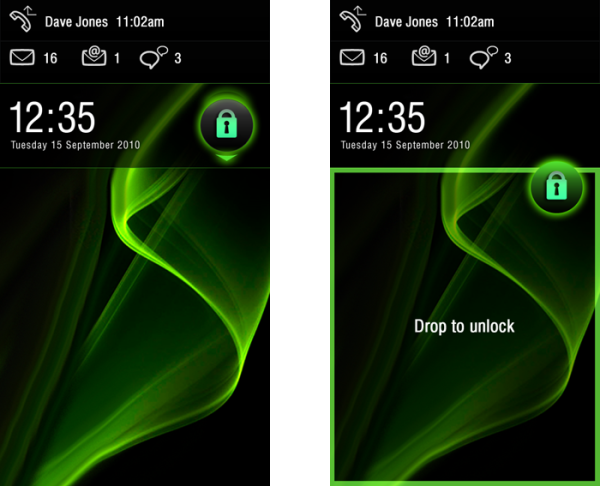
First lets look at the standard lock. The idle lock has a lot of relevant information including missed calls (and at what time), text messages, email messages and IM. There’s a big clock and then the date, underneath which is the lock wallpaper.
There are two lock mechanisms. The one below you have to drop the lock button into the square space underneath the clock. There’s no swipe to unlock or code or any particular drag combination. Just drop it in the unlock space.

Alternatively, you can drag and drop from the top downwards.
 Multitasking Carousel.
Multitasking has two views in MeeGo. You have the Nokia N8/Palm Pre like linear carousel multitasking of LIVE applications. Similar to Maemo 5, the background is similar to homescreen except darkened and blurred. Nice touch.
Note the simple design changes, especially of the bottom launcher. I prefer the second one, what about. you?
According to the blog page, the size of cards, amount of card overlap, zoom, and speed of carousel can all be modified in themes.
 Multitasking Grid
Alternatively there’s a Maemo 5 style grid view (Maemo 5 arguably has the best multitasking interface for a power user, with contextual automatic sized grid of live windows).
Notice on the second screenshot, what’s titled as maps and what appears to be a Google street-view esque page.
The amount of rows and spacing between
 App Launcher
This is the standard App Launcher view. You have a 3×4 grid and the persistent launcher bar. Whilst many customizations are again noted (Icon size, font, sound, haptics, feedback graphics), there was nothing about changing grid size to accommodate more apps. 4X5 should be standard of 3.5″ screens and above, though it is made difficult with narrower aspect ratios)
You’ll notice that you can switch sideways to more app pages (see in second screenshot the indicator at the top). In addition to the launcher bar (or quick launch bar), this part is quite iPhone like.
 Navigation Bar – more blurring
Similar to Maemo 5, to focus your attention on a particular part of the screen, the other parts are out out of focus – blurred a bit.
 There’s much more detail over at the MeeGo Blog page.

About the Author (Author Profile)
Hey, thanks for reading my post. My name is Jay and I'm a medical student at the University of Manchester. When I can, I blog here at mynokiablog.com and tweet now and again @jaymontano. We also have a twitter and facebook accounts @mynokiablog and  Facebook.com/mynokiablog. Check out the tips, guides and rules for commenting >>click<< Contact us at tips(@)mynokiablog.com or email me directly on jay[at]mynokiablog.comSubscribe
If you enjoyed this article, subscribe to receive more just like it.


Connect
Connect with us on the following social media platforms.