
App Review: Extra Buttons for Symbian (Demoed on N8)
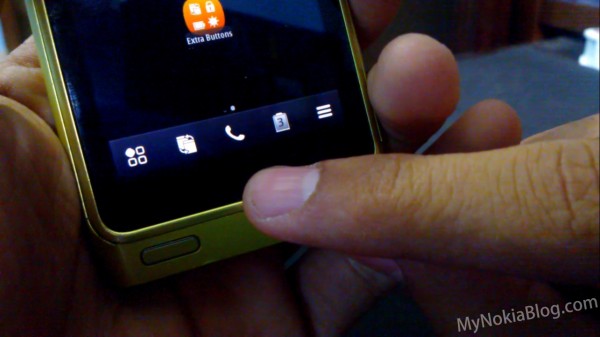
Extra Buttons is a really awesome app that brings  four extra shortcut/toggles onto your Belle task-bar (you only get to choose two)- I first found out about this app yesterday when Jay posted about the new widget packs for Belle. The four options for shortcuts are:
- Task-manager/App switcher
- Battery Saver
- Lock-Screen/Restart phone
- Brightness control
I was most interested in the task manager app as it provided the answer to the question “can we have a Symbian device WITHOUT a menu button”- simply the answer is NO; at least not yet- if this is the proposed solution (a softkey) then it won’t work because it’s not present consistently throughout the system. Still it’s a nice implementation for quicker switching (no long press needed) also it’s a workaround for people with problems with their Menu button.
The other shortcuts are pretty useful too- the brightness offers 4 settings (0%, 50%, 100% and Auto) which is a pretty time saving solution rather than having to go into settings and changing it manually; the Battery saver is pretty cool as well because it aslo displays the remaining battery percentage in the shortcut itself.
My only issue with apps like this is that they tend to be inconsistent; which becomes a nuisance more than a help because you can’t rely on them (I recall similar issue with the ‘FastPanel’ that was a Pre-Belle drag down status bar); hopefully Extra Buttons is a more consistent app.
Fast Panel is on the Nokia Store for 1 Euro/Dollar (currently only supports portrait mode- but according to the app info landscape is currently in Quality Assurance)
Store Link:Â http://store.ovi.com/content/262250
This application place two additional live buttons on the toolbar of the homescreen and application grid.
You can select between:
– Lock/restart button (restart on long press).
– Task switcher button.
– Brightness control (4 modes – 0 %, 50 %, 100 %, autosensor).
– Battery/Power saving mode (on long press).Landscape mode support update already on the Ovi store quality assurance.

About the Author (Author Profile)
Hey, my name's Ali- Currently a fifth (and final) year Dental Student from Chicago; studying in Jordan. I love all sorts of gadgets almost as much as I love my cookies! Be sure to follow my Twitter handle @AliQudsi and Subcribe to my Youtube for the latest videos - no pressure. Thanks. Since my days as a avid Nokia blogger I've completed my studies and can be found doing Oral surgery realted stuff here!!Subscribe
If you enjoyed this article, subscribe to receive more just like it.


Connect
Connect with us on the following social media platforms.