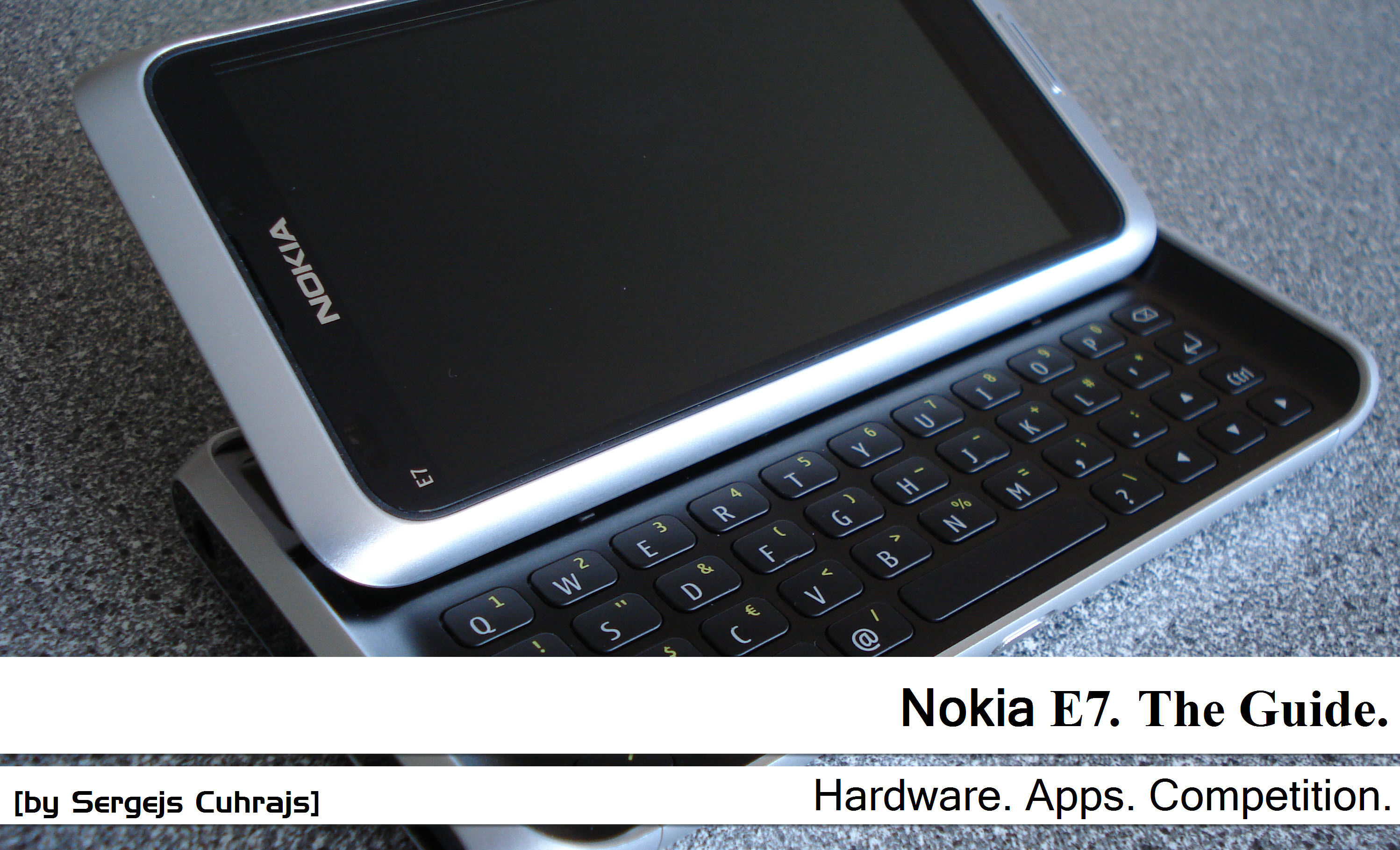
Nokia E7. The Guide.

| June 7, 2011 | 36 Replies

[Update - added PDF] What’s up everyone? I’d like to present here my little pet project I’ve been piecing together in my spare time… a visual guide to Nokia E7.

The idea is to offer a quick overview of the important aspects of the device without delving too much into the details. I’d also like to expand this on to my future reviews that would cover more comprehensive info while still retaining the compact, easy to read, nature of the guides.

(Pic Size: 5.57 MB)
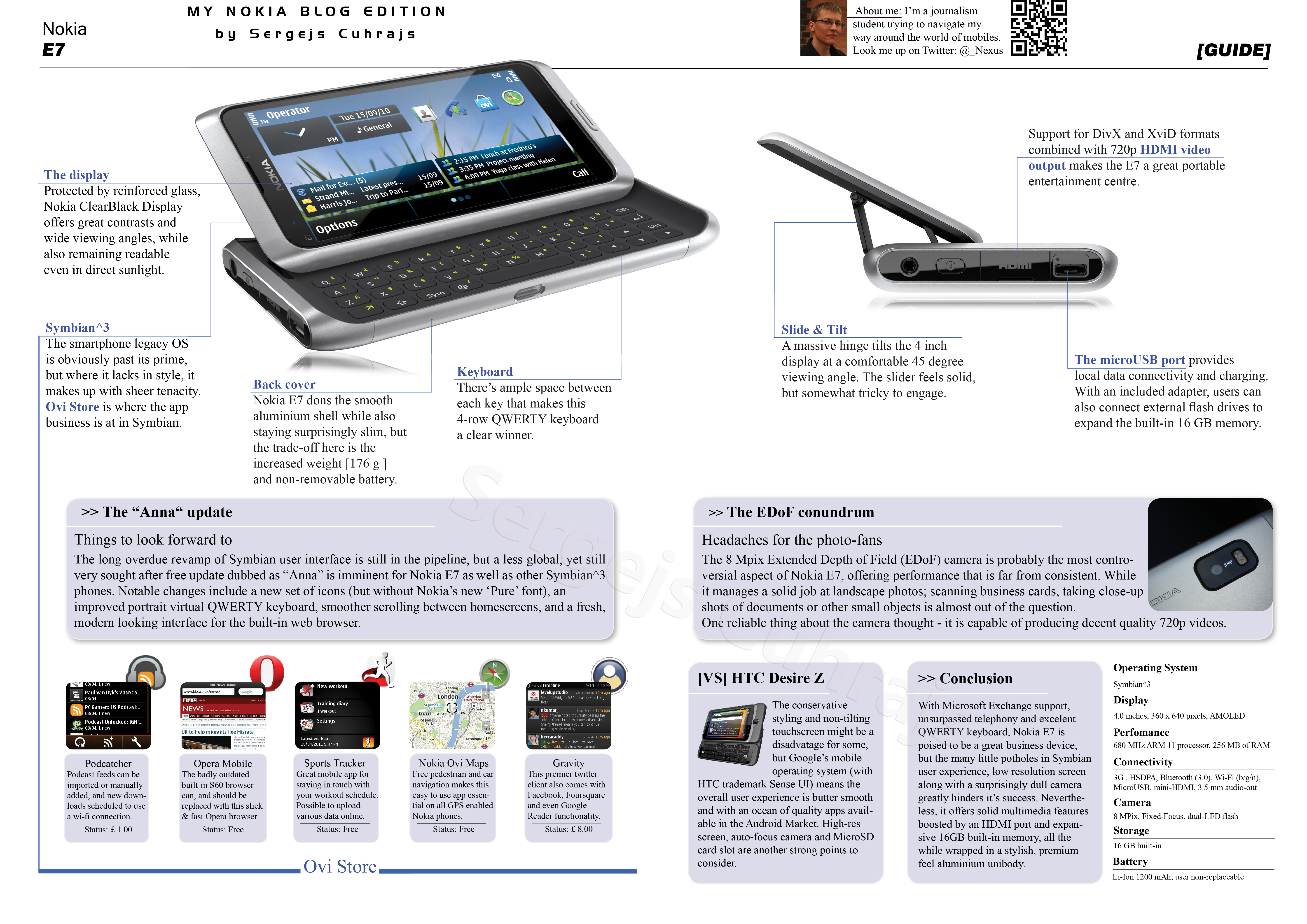
Nokia_E7_Guide_PDF

This first guide was more or less a training to learn my way around basics of inDesign, and hopefully following projects will be done at a much quicker rate! Now, what I need from you, dear readers, is tell me things you liked, and, most importantly, what in your opinion needs to be improved or added. With the help of your feedback, I’m hoping to bring more expansive, interesting guides (and reviews) to you in the future. Thanks a lot!

Tags: ,

Category: Nokia

About the Author ()

I'm Journalism and English student with a passion for mobile phones and the industry.

Comments (36)

Trackback URL | Comments RSS Feed

Sites That Link to this Post

  1. Visualising the E7 | WOMWorld/Nokia | June 7, 2011
  1. Nagol says:

    I really don’t mind getting this phone.

  2. Amey says:

    Nicely made…..though I have to zoom in and out each and every time since the font is illegible otherwise…

    • Thanks for your input Amey :)
      The new format gives me more freedom to try different things I wasn’t able otherwise, but I can also see the challenges that might arise here…
      In my case, I have a 1080p monitor so minimum zooming is required to comfortably read the entire article. But the experience might me completely different for other people, having different resolution monitors, or even using mobile screens…

      Perhaps you can suggest the optimum resolution you’d like for these kind of articles? A slimmer form factor perhaps? Let me know here, and I’ll see what I can do :)

      P.S. Might upload a PDF version of the guide a bit later…

  3. Rock says:

    “The ‘Anna’ update”

    That section is just lol.

  4. Seylan says:

    I totally agree about the Camera…One shot will be aweful, then the next will be amazing then…..
    One bad thing is the battery life…Just a few hours of playing Angry Birds, and it dropped to one bar(from a full charge) ! I love my E7, but I will change it to an N9(if it has KILLER specs) or a Nokia running Windows Phone 7.

    • Nagol says:

      @ Seylan

      Well dude if you’re playing those kind of games for so long that’s what’s gonna happen. Even if you play the emulators as well. You can’t play those games for too long cause it will eat up the battery faster than a hotdog eating contest. 15 mins at best you play with them.

    • Nik Rolls says:

      Mate, if you only lost 1 bar after *three hours* of Angry Birds then you’re doing well on any smartphone, even Nokia ones. Even a simple game like Angry Birds uses intensive hardware acceleration for its dynamics which isn’t kind on the battery.

  5. Jim says:

    HTC Desire Z can’t compete with E7 because its buit quality and qwerty really suck.

    • It’s the closest phone I could find with a qwerty keyboard from the Android camp… comparing it to the latest dual core monsters wouldn’t be exactly fair.
      If HTC Desire Z is worse in your opinion, then the choice is clear for you :)

  6. fernando gallardo says:

    nokia e7 sucks!

    • Alee says:

      so do you !!

    • msbionik says:

      I agree! My boyfriend got it for me for my B-day and I had the N900. Let me tell you, it DOES SUCK! BADLY! Yeah, so what, that the camera is 3 more MP than the N900 but can it even do any multitasking like it? Don’t think so. All it does is aggravate me to the point that I want to throw it against a brick wall.

  7. Cod3rror says:

    Sergejs, you should’ve spent your free time doing something more productive and fun than wasting it on this Nokia garbage.

  8. Cod3rror, I was mainly doing this for fun. I’m honestly bored of the same boring chunks of text and images we see every day in most tech blogs… I want more freedom to experiment.

    And hopefully I’ll be able to expand this to other phones, not just Nokia phones ;)

  9. Dynamo says:

    Well done Sergejs! I was immediately delighted to see such a nice change to the way I read information on this blog.

    Big chunks of text do put me off, and I’m liking the info-graph esque; along with the bar code link to your Twitter and the watermark, which add a very nice touch.

    In terms of resolution I think if you make it more narrow it will fit better on the majority of screens, mobile to desktop. Panning/scrolling will then be less of a chore and people can read it in sections without much hassle.

    Keep it up, I look forward to reading more of your posts!

  10. Matt says:

    “…offers great contracts…”, should that be “…offers great contrast…” ?

    Great diagram btw, excellent quality :)

  11. Jay Montano says:

    Great work Serg!

    Very useful infographic style. Something like this should be bundled in retail packs (though not including info on competition and questioning EDoF :p).

    What did you use to make this?

    Suggestions: If this type of graphic is to remain online my suggestion would be to have a portrait orientation, therefore you’ll minimise left right scrolling.

    Very good work (it’s in a similar format to Year 3 uni posters).

    • Cheers Jay :) Got plenty of good responses about it so I’ll continue experimenting with the format…

      This was all done using Adobe inDesign (and partially using my very basic knowledge of Photoshop as well), you’d know that if you’ve read the intro part ;)

      Hehe, I’d love to do infographics for big companies actually, but in this particular case I tried giving both the good and bad sides equal attention, so as to resemble a journalistic piece rather than pr…

      About portrait orientation – yeah, I heard that from multiple sources already, so I’ll opt for that when I start a project from scratch. This E7 visual guide (or should I better call it infographic?) was aimed to resemble magazine format as much as possible (I *might* have ulterior motives here xD).

      • Jay Montano says:

        Oh I read inDesign, I had no idea that was software – thought you missed a space and that in Design was something you did at Uni. :p

        I thought infographic was something more to do with statistics/number presentation. Actually that was a misconception on my part.

        On googling here’s what Graphics editor from National Geographic said about infographics:

        1. It’s a visual explanation that helps you more easily understand, find or do something.
        2. It’s visual, and when necessary, integrates words and pictures in a fluid, dynamic way.
        3. It stands alone and is completely self-explanatory.
        4. It reveals information that was formerly hidden or submerged.
        5. It makes possible faster, more consistent understanding.
        6. It’s universally understandable.
        http://communicationnation.blogspot.com/2007/04/what-is-infographic.html

        • These are a lot of points Jay, not sure I can satisfy all of them xD I fully agree that overall, it should be visually engaging, easy to understand, and concise yet very telling.

          But here’s what I also said to Antonio here: guide is supposed to help the reader in the discovery of facts about the product, and let him make his own decision in the end. Finding the right balance btw personality and impartiality is key, as always…

          I’m still edging towards calling it a visual guide, but I’m open to other suggestions as well :)

          • Jay Montano says:

            Oh I wouldn’t take that as a list of everything infographics must have. Any one criteria would make something an infographic :)

            Whatever you want to call it, it was a very good job well done.

  12. Matt says:

    I should have read the whole document before posting the previous comment about “contracts”. Here are a few other things that you might want to correct.

    Spelling: alimium -> aluminium
    Spelling: aluminum -> aluminium
    Spelling: wieght -> weight
    Spelling: obviosly -> obviously
    Grammar: “past it’s prime” should be “past its prime”
    Spelling: comforatable -> comfortable
    Spelling: varios -> various
    Grammar “hinders it’s success” should be “hinders its success”

    Please don’t take this as a criticism of the document, you’ve done a great job.

    I hope this helps.

    • Matt, your accurate feedback is greatly appreciated :) I’ve really no excuse for letting these mistakes slip past since inDesign has a built-in spelling checker, so yeah, shame on me xD

      I’ll update my guide with these corrections, and re-upload it since I have to export a PDF file here anyway.

  13. Antonio says:

    I think you should talk just a bit more about the keyboard. It is magical. Really.

    I have used it yesterday on a store for 30 minutes, and all I can say is “this is magical”. I remember not liking the N97 keyboard, and its tactical feedback, but the E7 is just amazing. I could start typing fast whatever I wanted to type when I just got to type it for the first time. I didn’t have to look at the keyboard layout or check which keys I was pressing, I simply started pressing random buttons on the phone and all the right letters were appearing on the screen. The phone feels great when you’re typing, the tilted screen helps a lot and it is great.

    Suggestions:
    - Make that a PDF… or something like that. JPG is just not very user friendly.
    - The USB OTG name should be mentioned, as well as something telling the user that he is not limited to sticking a pen drive or something on the phone to increase the phone memory, as if memory was limited. Mention “USB On-The-Go” and tell it “allows the user to connect many different peripherals to the device, just like you would do on a pc. E.g: pen drive, HDD, mouse, keyboard, cameras, etc”
    - The part talking about Symbian makes everyone who has read the “symbian is dead” headlines somewhere even more confident about its death. Don’t just say “it sucks, but you can’t get the phone without it”. Say something good, too. (I think in english too, but if not, at least in portuguese, “tenacity” means “persistence, as in the resistance of a metal to rupture by traction”. It’s like “this OS is already destined to die, but it’s still holding on”)
    - Compare it to similar other Nokia phones and tell the differences quickly. e.g.:
    Nokia N8 vs Nokia E7
    Feature: N8 – E7
    CAMERA
    Resolution: 12mp – 8mp
    Autofocus: Yes – No
    carl zeiss: Yes – No
    Xenon flash: Yes – No, dual LED
    CONNECTIVITY
    microSD: Yes – No
    2mm charger: Yes – No
    FM transmitter: Yes – No
    SCREEN
    Clearblack tech: No – Yes
    Size: 3,5″ – 4″
    Qwerty keyboard: No – Yes

    Symbian Anna built-in: No – No
    Price: R$1299 – R$1599 (insert your price here, this is the price on Brazil)

    • I fully agree about the exceptional quality qwerty keys of the E7, Antonio! I gave the necessary credit in the conclusion part, but I also didn’t want to overly focus on this one aspect in my guide. I mean, the keyboard is clearly a very strong selling point, but it doesn’t make the whole product. There are many other things people should consider when buying this phone.

      About your other suggestions (thanks in advance!):
      - PDF: I’m working on it. It’s possible it will be already up when you read this :)

      - I’ve mentioned the core USB OTG functionality (probably in a very subtle manner) in the microUSB port section. Connecting the mouse or keyboard is a very nice touch, but hardly an aspect the user will base his decision on when buying the E7. Coming from what you’re saying, I think you want me to focus entirely on the positive aspects of the device, thus sacrificing the balance of the guide. I’d gladly write PR pieces for Nokia, but right here I’m trying to deliver an impartial view of the important aspects of the E7 without going into too much detail. Think it as a review, only more concise, accurate… yet still very telling.

      - I believe I gave Symbian a fair look here. People will always read a lot between the lines, depending on their background and what they’ve read before about the OS. My point was, that Symbian is not the best looking (thus, ‘lacks in style’) but you can still trust it get the job done (‘sheer tenacity’). A guide (and a review, for that matter) is supposed to help the reader in the discovery of facts about the product, and let him make his own decision. Of course, every written piece will still be biased in a way, and we can’t rule that factor out entirely unless we let the machines and not the humans do the writing.

      - I’m still hesitant to include a price on the handset here, since prices differ wildly and could get confusing in the end. On the other hand, for comparison purposes I agree it would be very useful – the price can be a decisive factor between too very similar products.

      - Comparing the E7 with similar Nokia phones is something that I was considering at one point, but ultimately I decided it would be far more useful to take an outside view and pit the E7 against other companies products. For my next projects (and hopefully I’ll have more time then) I might do multiple comparisons to also include similar products from Nokia. And thank you for your handy comparison table, I’ll keep it in my ideas folder for next time :)

      • Antonio says:

        I can’t help but be a little “positive” about Symbian products, because over the years I have just felt like people simply don’t know what their phones is able to do. They just don’t do anything useful with it… I know at least 3 people who have had an Nokia N95 and never knew it had GPS, multitasking, downloadable content and apps, TV-Out, and used the phone solely for calling and texting. And these same people were asking me which device they could buy to get the very features their phones already had! This has led me to overly emphasize features.

        - It’s very nice to see you got the PDF! I could not open the PDF, though (it’s probably a problem on my side, I’m browsing the web on like 100 tabs (literally) and my browser is taking up 1,5GB of RAM, so don’t worry, I’ll find a way to open the PDF later).

        About USB OTG:
        - Ok, you’ve mentioned one of the use cases, but you didn’t expressly say “USB On The Go”, the way it is written can make it look like you can’t do anything else with it (in my opinion). You can say “USB On The Go” on the specification and mention something more than plugging pen drives and leave it with “etc” to make it broader and more general. Just an idea.

        Symbian:
        - That’s ok for me, it’s just that looking up the dictionary for a meaning to “tenacity” didn’t make things look very good…

        About prices:
        - It can, in fact, differ wildly. However, you can just take the prices from Nokia themselves. That’s what I did there. I could get the N8 for R$1000 or R$900 if I wanted, but the official price on Nokia website is R$1299. Same for the E7 (except I can’t find it for R$1000 hehe). If you want to give the price, I suggest sticking to one single place where you could purchase most of the phones, and get the average price. E.g.: get all prices from nokia online store, or get all prices from Amazon (Best or average price), or all prices from eBay, etc. If you get all prices from Nokia, you’ll be giving more expensive values for the phones than you might usually expect in your country, but in Brazil they’re accurate enough for me so I used them.

        - Comparing it to other phones is good, but personally (maybe I’m part of a niche group, but it’s just another idea) I believe quick feature comparisons are best when deciding which smartphone to take from two or more phones. e.g.: The one I gave as an example (N8 – E7) would make me instantly just see the graph and take my decision immediately, according to my own needs: “I’ll take the N8″. Some other people could probably say (and I have a friend who did) “the Qwerty keyboard is too important for me and I don’t use the other features so much, I’ll still take the Nokia E7″.

        I would love to write more and give some other suggestions I have but I can’t right now because it’s too late and I’m already over my time so I’ll just leave this comment here and come back later. :)

        • Fair points there about the USB On The Go, Antonio :)

          Maybe MNB should get a sponsor from one of the on-line mobile sellers that prices I’d include in my reviews… Jay, get on it haha!!

          If you can’t open the PDF file in the browser, try right clicking and saving it directly to your computer, hopefully it works for you that way ;)

          I’m actually one of the most nostalgic, old-school Symbian users there is :) My roots start with the original NGage (R.I.P) and go all the way through the golden age of Nseries and ends (but not dies) with the N900 (which is my all time fav phone). I have the granddaddy of Symbian phones, the Nokia 7650 in my collection, with a possibility of acquiring N90 as well…

          Point is, deep inside, I’m very positive about the OS, but at the same time I’m not blind at what really goes on. No matter how much I love the past golden age of Symbian, that time is over now…

          Of course nowadays, most peeps take it as Symbian is broken beyond repair, which is simply not true. Like I said, it’s a hardy platform that will get the job done. It’s just a matter of how elegantly you want to accomplish something, that’s where Symbian stumbles.

  14. gordonH says:

    Just installed SmartPocket Lock on my E7. Uses Rotation sensor+Proximity sensor to lock your phone when u put it in your pocket. Phone doesn’t lock when u use it in landscape.
    This application deserves applaud from e7 users.

  15. leon says:

    great job, a nice way to discover it

  16. Hendrik says:

    I totally agree, the e7 sucks. No wonder Nokia is losing market share. The E90 was the last good business phone. Nokia took too long to go touch screen systems and lost the plot. The E90 was perfect if they could just have added a touch screen for browsing. This junk they call E7 is worse than windoze pc with its eraticness. Displays a call on the screen. You can answer but once answered although buttons display on screen they are not active. You have to activate/deactivate lock before they work
    Just tried to switch phone off, the switch did not work, had to look for meny to switch off. Tried to send message. Type message select recipient from contacts select the tel no and nothing in the to field. had to cut the message(to save retyping) start new message, select recipient , paste the message !! Stupid phone get yourself and iphone!!

Leave a Reply