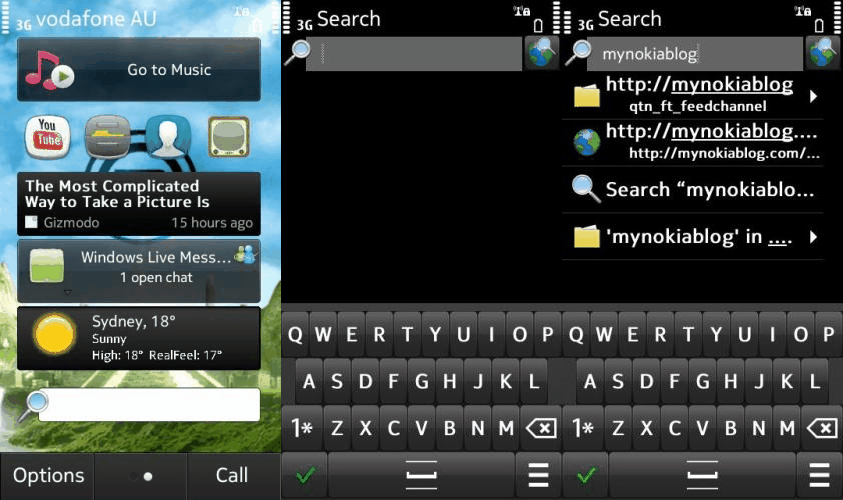
Universal Search Beta
I know we have already brought you an article regarding Nokia Beta Labs’ new toy, Universal Search Beta. However, it was a closed trial (invite only). This still hasn’t changed, although i have come across a leaked installer of the new Search (2.39.176). I have been using it on my N8 (PR 1.2 – No mods) for a month or so and it has been working well. The screenshot above was taken on my phone just the other day.
It is very similar to Apple’s spotlight search in the sense that it not only performs a local search (files, contacts, messages, etc.) but also performs external and application searches (Ovi Maps, Google/Bing, Here and Now, Wikipedia, etc.)
- Find people, places and content, whether on your phone or on the web
- See suggestions as you type, even if you’re not sure of the spelling
- Search the web from the home screen or any browser URL bar
- Go right to your content with Smart Contact and Smart App widgets—shortcuts automatically populated and updated based on your activity
The video was uploaded all the way back in April, but it’s unlisted, meaning only those given the link would find it.
Seems it has its own portrait QWERTY.
Happy Searching,
Michael
Category: Applications, Nokia, OVI, Symbian^3


Off Topic: You have a widget on homescreen which is showing the temperature and conditions.. Could u please tell me the name of that??
It’s called AccuWeather
http://store.ovi.com/content/8021?clickSource=publisher+channel
download universal search beta
http://www.usershare.net/c2113luaalb3/Search_2_39_176_installer.sisx
Dosn’t work for my N8. Stuck at “Indexing (100%)…” and not moving..
Have you tried an uninstall, reboot, and reinstall?
Rebooted after install, still the same problem. Haven’t tried reinstalling though…
Same on my N8. Fails to install. This is sooo tiring. I’m hoping for the competition to come up with a decent well-designed Android camera phone in the next 12 – 15 months so I can finally switch. No interest in WP 7 tiles.
I have been waiting for that portrait keyboard for 9 months now. What I see in the leaked version as well as on the X7 is a joke, not to mention the lack of split-screen input. Is it really to much to ask for the keyboard shown on the above screenshot in that search app to be integrated as the standard keyboard in the final Anna release? Are people at Nokia working together at all or is everybody working against each other? If one department managed to come up with a normally spaced portrait keyboard (hurray, big breakthrough!!!), is it then absolutely impossible for another department to reuse that code in other applications or even throughout the whole operating system? Sometimes I’m really surprised at how good of a job Nokia does of destroying themselves as in “MeeGo looks really cool – we want it!” but “No, we’re going with WP 7 no matter how successful MeeGo will be” since we don’t care if nobody likes tiles and the OS doesn’t sell on other handsets either.
PLEASE. STOP. COMPLAINING.
You’re right. No need complaining. Need to act.
I think you higlight some very intrinsic problems of Nokia. They should shape up and start re-using their code and sharing codes btw different departments. This way, there will be faster updates and syncronized ones as well!
Thanks, after a reboot it works on E6, too, except for the contacts.
Anyway, the design of the widget is horribile…
That app froze for me a lot…. so I uninstalled it.
Same, finally got it to work. However closing the app takes a long time and stays in that ‘freeze status’. Guess i’m not going to use it. Hope it comes built in to anna as it seems to be an external application and takes up quite abit of RAM..
really? ive never had that problem maybe the leaked version you guys are using is buggy
I’m using the official firmware for my product code.. still PR1.2
reupload again pls. i will try it..
isn’t that bundled with the leaked anna?
anyway, have been using it for a month now. works really great.
So anna comes with this built in? Awesome~!
No Anna doesn’t come with this, the custom firmware that he’s using comes with this.
i’m liking that portrait qwerty…
Agreed. I hope that is implemented into Anna. I’m sick of the opera and iphone style where the buttons are too small and you push every letter but the one you want.
for those who have access to the closed trial is there a newer version to this?
the only version i see available on betalabs is from 13/06/11 when the app was released
dont know the exact version number i dont have my phone with me atm
No, this is same version as was released for trial..There is no later version ..(Yet)
Actually, after flashing with Anna, i have version 2.39.193
question is…..does it change the QWERTY portrait layout ?
tested it out! works great! loving it!
I tried this from invitation. And it has its bugs.. Once its up and running , its ok, but battery hungry and needs consistent internet access..
I still have it, but dont use it..Still needs some improvements yet.
How did you get an invite? I’m quite curious
email..out of the blue..
Active participation on beta labs i guess..have an Alias..
As do i, Oh Well. Maybe next time.
I installed a later version of Anna CFW this morning, and its working much better..
Can you or anyone with an X7 tell me what the split screen portrait qwerty is like in Anna? Similar to this beta trial or more like Opera style?
not working on my c7.stuck at opening of widget.
EDIT:guys i have seen smart apps and smart contacts widgets in my widget catalogue after installing search widget.have anyone noticed it?
Yes, this is the the part of the app in which your most frequently contacted contacts and most used apps are updated as shortcuts. To make use of these, put the widgets on your home screen and watch them automatically populate.
i tried this on my n8 works great. in settings i put off the gps and web search..