
Tutorial: How to install VLC on your Nokia N9/N950(Update: Uninstall instructions too!)
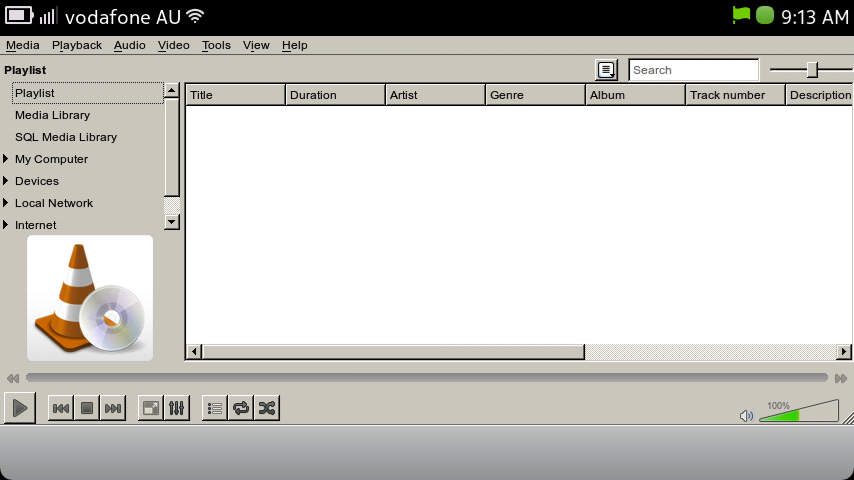 A few weeks back I brought you info about a VLC port coming to MeeGo Harmattan.
It is relatively simple, but some people may find it a bit tricky as it uses Terminal commands, so I am gonna run a step by step guide on how do to it.
Step One:
Download libvlc5 and vlc-player on your PC, and transfer it to your device. (It is easier to download from your PC as Web tries to open it straight and it will not install.)
Step Two:
If you haven’t, you will need to enable Developer Mode by going to Settings > Security > Developer Mode and hit the “switch”. For the first time user, you will need to download and install a few files, as well as reboot the device. (Once you complete the install, you can hit the switch back over and next time you want to use Dev Mode, no install needs to be done.)
Step Three:
In Terminal, gain root access by typing devel-su and when prompted enter password rootme .
Once you have gained root access, type cd (directory you saved the two files in) eg. cd /home/user/MyDocs/Downloads/
Now enter the following;
dpkg -i libvlc5_*.deb vlc-player_*.deb
A lot of writing will appear and you may be prompted to enter y to confirm the install.
NB: It may display some errors, don’t worry, everything works eventually.
Step Four:
If it worked, there should be the VLC traffic cone in your apps list. Run the app, and enjoy.
Just a heads-up, the UI is NOT optimised for MeeGo, it looks like the desktop version, so hitting some buttons are a bit of an issue, but after you get the hang of it, it works well.
For those who do not plan on using Developer mode on a regular basis or do not know what they are doing, I suggest disabling as your device can be hacked easily while you are in this mode.
Update: After being asked by Nabkawe in the comments about how to uninstall it, I thought I should include it in the post.
So in case you experience unforeseen side affects, or don’t like the UI, or whatever your reason is, here is how you uninstall VLC.
Step One:
Make sure you have rebooted device after install
Step Two:
Again, enable developer mode and go into Terminal.
When in terminal, gain root access, and type apt-get remove vlc-player.
You will be prompted to confirm uninstall.
Step Three:
Check the traffic cone is no longer in apps, and the uninstall was successful.
That’s it! VLC is now uninstalled.
Cheers Whatever for the tutorial request 🙂
Michael
Category: Applications, How to:, MeeGo, Nokia, Nseries

About the Author (Author Profile)
Hi! My name is Michael. I currently live in Sydney, working on all things Digital Marketing. I have a real passion for the latest technology and I'm a real Nokia buff! My aim is to keep those of you, like myself, updated with the latest in what's going on in the Nokia World. Get in touch on Twitter via @MFaroTusino, or even simply drop me an email at mike.mnb[at]outlook.com or tips[at]mynokiablog.comSubscribe
If you enjoyed this article, subscribe to receive more just like it.


Connect
Connect with us on the following social media platforms.