
HowTo: Fix Mail For Exchange with Hotmail/Live/Outlook for N9
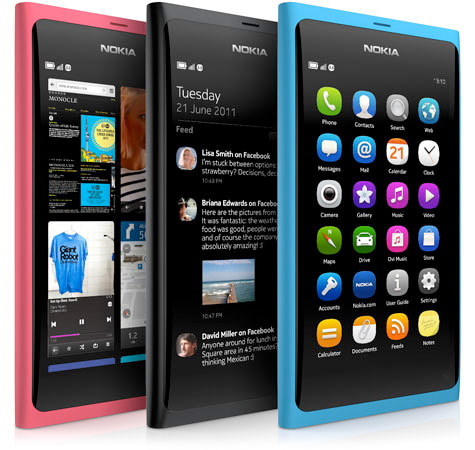
Something that every N9 user that uses MFE with a Live/Hotmail/Outlook account has been affected by, is that the N9 no longer syncs correctly. This was caused by Microsoft updating some protocols or something technical like that, and Nokia not rectifying the situation. Here are two really quick fixes that have not only worked for me every time, but other people I’ve helped.
First up, you’ll need to log into your email from the web (whether it is your phone or computer doesn’t matter). Once logged in, look at the address bar. There will be a six-character combination at the beginning, 3 letters, 3 numbers. For example, mine is snt002. The important part is the first three. Take note of that somewhere.
Now, on your device, go to Accounts>MFE Account>Conn. Settings>Server Address. Here, type your 3 letter code followed by -m.hotmail.com. It should look similar to this: snt-m.hotmail.com
Once you’re done that, try synching your account again. If that doesn’t work, don’t panic.There is still one more thing to try. Download an app called memailsettings. Once installed, select easy tweak mode, select your account, enable “Force EAS protocol version” and type 2.5 in the text box below.
Try re-synching your MFE account, and it should synch.
I’ve done this each time I’ve enabled MFE for a Live ID and it works each time.
Comment below the results on your device, and if you have issues, hopefully myself, or others can help.
Michael


MfE was never really the problem with mine. Gmail account and other email account(yahoo) stopped syncing so I decided to just forward all my mail to gmail account and step it up through Mfe and it worked no problem(though theres a 30 minute delay on my yahoo mail from forwarding). And also email notifications dont show up for MfE. Say what you will about the Lumia 900 but at least I can thoroughly rely on it email-wise.
Ever try searching/following the main Harmattan email thread at TMO, would’ve had your issues resolved many moons ago if you did.
Never had an issue with my normal emails accts, BUT I’ve seen users with similar issues to you that are inevitably ALWAYS fixed.
One of the “former” Harmattan devs (Sergey) is STILL extremely proactive & helpful there…
Email notifications work fine for MfE, no idea what you’re talking about, that I’ve definitely not seen ANYONE complain about.
This is the main thread I’m referring to:
http://talk.maemo.org/showthread.php?t=78480
There’s other resources, but it’s probably the best spot on the net.
Closed formats, closed source and vendor lock-in working very hard to make you live more exciting!
Secure IMAP FTW.
IMAP indeed does FTW although Nokia do seem to have introduced a few bugs in PR1.3 with IMAP accounts. Mail’s backend doesn’t seem to update the message counters or the ‘Recent Messages’ combined mailbox due to what seems like a bug in updating the SQLite mail database.
Sergey is looking into it when he gets time in September.
It’s very nice he’s doing this but one has to wonder why there isn’t an official developer still at Nokia doing this!
Something like that I have posted here a month ago.
http://my-symbian.com/forum/viewtopic.php?t=44186
And? You didn’t devise the fix, it was devised in the harmattan email thread at TMO.
Thanks. Worked fine after setting up memail.
Fixed!………now working via the first 3 character fix.
Cheers for the tip!
you saved me
This is obviously Elop’s fault, he sabotaged N9 email capabilities AND made almost every major enterprise use Exchange servers for emails. that evil man!
This issue wasn’t caused by a flaw with the N9 itself.
It affected many other platforms, see the original thread at TMO.
Apparently dub-m.hotmail.com & debug-m.hotmail.com are working for me. Can also try these if you don’t feel like installing that tweak :p
I have had no problems with my N9 mail sync but I wanted to ask, is it inevitable? I mean, if it hasn’t happened, should I expect it to?
Thanks for the tips Michael+gang.
I have a question:
Since Nokia Suite now works with the N9, I’ve been syncing my contacts there. Apparently, you can only choose to sync with only one, either Nokia Suite, or MfE.
I tried setting up MfE with my GMail, but contacts was so messed up (for me) that I abandoned it.
Is syncing contacts via MfE to Outlook/Hotmail/LiveID better? And what are the advantages and disadvantages over contacts syncing via Nokia suite?
Thanks for the very useful post btw
MfE (for email) when using Gmail act isn’t needed, IMAP works very well in the standard Gmail acct.
Contacts, cant recall what I did OTTOMH, & I dont have my ph with me right now, but it also works & never with any issue.
If I got a minute later I will share my set-up…
Hi John, thanks for taking the time to reply.
I don’t have any problems with e-mails (IMAP) or calendar (CalDAV). I was only trying to find a way to back up my contacts. Tried to sync Contacts only with GMail via MfE but the contacts field in GMail itself got messy (2nd mobile number either missing or in ‘Others’ field. I was just wondering if this is normal and acceptable or is syncing to Hotmail/Outlook via MfE produce better results/contacts syncing (i read somewhere that they could sync their three devices via their LiveID/Outlook)
Cheers!
@izuan
If you want to sync contacts for your GMail acct (probably not possible for Hotmail) read this thread:
http://talk.maemo.org/showthread.php?t=81712
Not sure how it compares with Nokia Suite…
Exchange ActiveSync is a proprietary locked-in piece of crap that makes you an M$ slave
Seriously, open protocols for email and calendar sync like secure IMAP and CalDav are the way to go. It’s just that enterprise often favors proprietary solutions because they’re easier to set up and top management are wary of open source products, so mobile devices also end up reflecting this trend.
At present, there’s no support for any open protocol contacts sync in the N9 – eg SyncML or CardDAV so if you want contact syncing, you’re stuck with MfE for that.
I noticed today that someone has got Sync Evolution running so perhaps that will solve the contact sync problem and we can finally ditch MfE. The Sync Evolution port has no GUI currently so some way to go yet.
http://my-meego.com/software/applications.php?name=SyncEvolution&fldAuto=1819&faq=29
There is support for SyncML it’s just not there OOTB, have to mess around in terminal to get it going.
There’s a great thread over at TMO about it that popped up at least 4mth ago.
There’s even some GUI aspects that are activated IIRC.
I can’t recall if it included CardDav, dont think so.
Here’s the thread (read it all) a slightly better approach than syncevolution, though still room for improvement:
http://talk.maemo.org/showthread.php?t=81712
Big thanks to Michael for these tips!
Never got this to work on my N9, now it does.
Had to install memailsettings to get it fixed.
thanks!
@Michael
For the 2nd fix, in the main thread at TMO, pretty sure I recall reading that it’s best you delete your acct & re-create, before applying it.
It has stopped for me. It keep on syncing with no result. But mail sending is ok. Problem is with receiving. It was working fine almost 10 hours ago. I have made no changes at all. Setting is done a month ago as it is written in this article. Anyone there having this issue or I am alone? Also any suggestions plzz???
@Ch.saqib
You’re best off posting/searching here:
http://talk.maemo.org/showthread.php?t=78480
Read AT LEAST the last 10 pages…
Most others that have applied the fix correctly have had no issue.
If you do find a sol’n to your issue share it here for others.
It has started working on its own. I think it was caused by the heavy attachments.
@Ch.Saqib
Thanks for the update!
Hi. I’ve tried this on my N9, but when I use memailsettings and select “easy tweak mode” it can’t find my exchange account. When I try to set up the exchange account (I followed your instructions carefully) it keeps asking me to sign in, so I cant actually save the account. Is there any way around this?
Please don’t necro here, this is a FAR BETTER* place to seek help:
http://talk.maemo.org/showthread.php?t=78480
*& more appropriate
You rock !! Thanks for the post