
Android-like Pull Down status Bar for Symbian^3, free at Ovi Store
| May 4, 2011 | 23 Replies

Can’t wait for PR3.0, new UI which features (amongst many things) a drop down status bar with quick access settings (Maemo esque)?

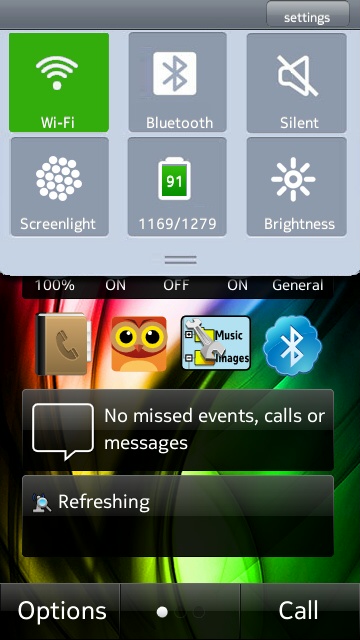
Then head over to the Ovi Store and check out Fast Panel. There are already some quick access settings in Symbian^3 such as quick access to bluetooth and profiles but what is really nice (and I’ve gotten used to since the N800/N900) is the ability to change brightness on the fly. Ever wake up when it’s still pitch black and that screen just kills your eyes (even with the over zealous dimmer in the N8)

http://store.ovi.com/content/118959

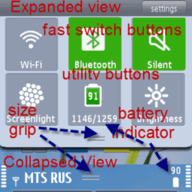
Two positions panel of fast access to frequently used functions. Expanded view displays a fast connection to Wi-Fi, Bluetooth, turn Slient mode. Utilities: On-screen torch and adjust the brightness. Displays the battery level (in terms of capacity). In Collapse: the battery level and fast lock your phone (top left corner of the screen). Allows you to unlock your phone by pressing the camera key. Languages: en, fr, ge, sp, it, ru.


via lovemynokia

Cheers for the tip, Nokiafan!

Category: Applications

About the Author ()

Hey, thanks for reading my post. My name is Jay and I'm a medical student at the University of Manchester. When I can, I blog here at mynokiablog.com and tweet now and again @jaymontano. We also have a twitter and facebook accounts @mynokiablog and facebook.com/MyNokiaBlog. Contact us at tips(@)mynokiablog.com or email me directly on jay[at]mynokiablog.com

Comments (23)

Trackback URL | Comments RSS Feed

  1. meegomad says:

    nice! this i like :)

    and pr3 wont be coming out till the end of 2011 or even the start of 2012

  2. Peter says:

    so.. after installing it. Were is it?.. Where is the drop down menu?

    • meegomad says:

      i cant find it either???

      i started the app but nothing on homescreen

      • meegomad says:

        ok its working now uninstall the one you installed

        then open ovi go to account, then prefrences then installation prefrences and select install apps and games into c drive

        then download this app again and install

        then restart now mine works :)

        its functional but its not slidy but drop when you click something and hides when you click something

        not bad for symbian

        • Jerso says:

          Thanks! It´s working now.

        • elathur says:

          ok, followed those steps. now what? how do i see the pull down? where do i click to get the settings pulldown? and when you say restart, do you mean the phone or the app?

          thanks.

  3. Felix says:

    All they think about is symbian s^3,the other symbians are dumped.

    • Postm says:

      You’re not missing much here. Doesn’t work on my E7

    • meegomad says:

      its the hardware

      and symbian^3 is not that old so itll get new apps

      other symbians are too old and wont

      please dont moan about other symbians(2+years older) is not getting attention symbian 3(less than 1 year) is getting killed off soon thats a bigger disappointment

  4. cgf says:

    my worry is if pr3 is out, can all the current apps in ovi store work with it?

    • meegomad says:

      qt apps will work

      others might not but can be easily converted into qt

    • PJ says:

      The Pr3 UI update is just written in Qt instead of the old symbian programing language. This does not make all non Qt apps not work since the base code to which the apps are written for won’t change.

      Just like Qt apps an regular symbian apps work right now will still be the case after the update.

  5. subraj says:

    i installed it.but where is it?i cant find it working

  6. Paul Grenfell says:

    Wouldnt work on my N8 .. Just froze the screens..

  7. Paul Grenfell says:

    Yeah, thats more like it Mamos.

  8. Paul Grenfell says:

    Appears from reviews, this has to be installed on C: drive for it to work..
    I dont have much memory left on C, so i wont be installing it again.

  9. Paul Grenfell says:

    Sucker , arent i.? Installed via PC on C drive and is working just fine now..

  10. SGean says:

    The Wifi thing works kinda funny… I would rather they replace it with the “Connection Manager” shortcut.

    Also the silent key’s kinda redundant as you’ll still have that clock widget on your homescreen that lets you do the same thing.

    Btw, anyone knows how to set a timed profile without having to go all the way into settings > profile > silent > time?

    • Sergiu says:

      I have nokia situations shortcut on the home screen.
      Click on that and then long key press on a profile and select timed…
      It’s pretty ok from my point of view.

  11. nrde says:

    Meegomad: Nokia is still selling Symbianˆ1 phones today, so that is not the reason programs not supporting it anymore, also PR3.0 is still compatible with legacy symbian programs and Qt is not a requirement.

    SGean: I have used Nokia situations for that. There might be an shortcut, but I haven’t used or haven’t had the need for that.

  12. Grafx1 says:

    Please, what’s that theme in the screenshot ?
    Thank you…

  13. Kozzi says:

    For those only interested in changing brightness, look for DzLight. It works the same way and you can install anywhere, quite light on source too. Just slide down from the upper edge of the screen and you will have a nice brightness slider. Works on homescreen and menu.

Leave a Reply