
How To: Re-Download the Ovi Store, for any reason!
Just an FYI/ Helpful tip for our Symbian friends.
To anyone that has not received the new Ovi Store update or needs to re-download the Ovi Store for any reason, here is the link to the Ovi Store download:
http://store.ovi.com/content/5406
I suggest bookmarking the link on your PC for future use.
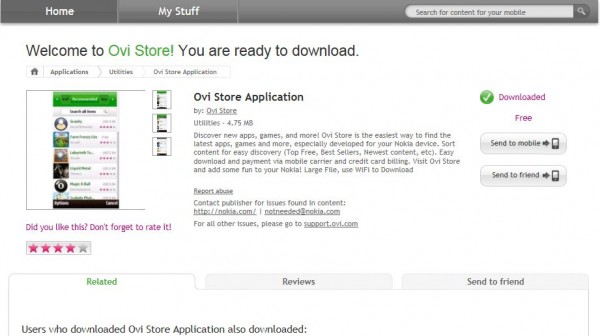
After clicking on the link, log into your Ovi Store account and click “Send to Mobile”. After receiveing the text message and clicking it to open the link , the latest Ovi Store will be installed to your phone.
I just reinstalled the store after messing it up with random QT installs.
Even though the picture on the web store shows the S^1 store, the Ovi Installer will download the latest version to your phone. The version number is 2.08.042 and should have a matching number for the Ovi Store installer.
I hope this is useful to someone.
UPDATE: One of our readers has pointed out another way, one that my benefit more users, to obtain the Ovi Store sis file via direct download from the Ovi Store:
albin says:
Great. You can also download the sis file to your PC using /download method. Good for people who dont have data plans or Wi-fi.
http://store.ovi.com/content/5406/download
Thanks albin!
Category: 5th Edition, Fun, Games, How to:, Nokia, OVI, Qt, Symbian, Symbian^3
About the Author (Author Profile)
My Current Devices: Nokia Lumia 710, Nokia N8 - Silver , Nokia N900, Nokia C7 Astound, Nokia 5230 Nuron, T-Mobile SGS2, T-Mobile HTC One S and soon, hopefully, a Nokia 808 PureView! Favorite phone of all time: Nokia N82Comments (56)
Trackback URL | Comments RSS Feed
Sites That Link to this Post
- Ovi Store Installationsdatei « S60inside | June 15, 2011


Great. You can also download the sis file to your PC using /download method. Good for people who dont have data plans or Wi-fi.
http://store.ovi.com/content/5406/download
the installation bar became completely green and then say:
“unable to install” !!!!
why?
nokia c7 firmware 014.002
I had the same problem. Re-flashing wont help you. Just hard reset it once. After that, don’t install any qt,etc. Just go to SW update app on ur phone and download the ‘ovi store’ update (around 15mb). It’l work.
thnx for the link…so u r now a part of MNB team???
gud to see more US guyz joining in!
You’re welcome. I am glad to have the opportunity be a part of the MNB team. I have watched the site and team grow over the years and MNB has always made honest contributions to Nokia readers in a respectful way. That is the kind of team that I want to be a part of.
Thanks for welcoming me to the team!
Deaconclgi finally in here…
Great to know you have some time for blogging! You have been one of the few who posted real comments over at engadget the last few years
Great to see you on board of MNB!
This should also bring the newest Store to everyone, even to those that hadn’t rolled it out yet.
Thank you as well!
Lol, I didn’t think anyone read my comments on Engadget, as my comments usually quickly get lost in the bash-fests.
Now that summer has arrived, I may have more time to research and contribute.
after resetting my phone I can’t install Ovi Store. Keep on getting ‘unable to install’. Have tired everything: went to nokia care, flashed the phone myself
Could some1 help?
I got the same error when i tried to install straight from albin’s link with N8.
But installation worked after I downloaded .sis file with computer and moved installer to memory card. Then started installing from file manager.
If you’re encountering the ‘Unable to install’ message after the progress bar reaches 100%, then join the ever-growing club of people who need to go to a Nokia Care Centre for a reflash.
There are posts all over the place with suggested solutions but I have not yet found one that works.
went to Nokia care twice and they flashed it twice but still I still can’t install Ovi store
I would suggest trying to get ahold of the latest QT 4.7.3 files and installing those and then install the Ovi Store.
Google: “Qt 4.7.3 (for Symbian, desktop, and simulator) and Qt Mobility 1.1.3 APIs.”
INSTALL AT YOUR OWN RISK Also, if you have Anti Virus software for your PC, run it after searching for sis files. There are some mean people stashing Trojans in various places lately. I got an alert just browsing some of the search result pages.
Another option is to download the Smart Installer from Nokia Developer site, install it first and THEN install the Ovi Store sis file.
http://www.developer.nokia.com/Community/Wiki/index.php/Nokia_Smart_Installer_for_Symbian
The Smart installer *should* pull in the necessary QT files to install the Ovi Store.
As always, installations outside of official Nokia releases are at your own risk.
I already have the latest Qt 4.7.3 got it from SDK 1.1 download, but still couldn’t get Ovi store installed.
Will try out the smart installer. Thanks
Just install ‘nokia drop’ from nokia beta labs. This is the simplest way. Try it
can’t install Nokia drop as well
Did you try to install the sis via Ovi Suite? Connect the phone via usb ove suite connection and then double click the sis file and follow the commands. Or reinstall the firmware via Ovi Suite?
After taking the phone in to Nokia care twice without resolution, I would request a warranty replacement device.
Lol what a douchy reflash then…
If you hack your phone it’ll instally anyways… You can even force installing without dependencies met.
Still this shouldn’t be necessary
I reinstalled ovi store but still my store seems not to show updates and closes
Try installing the Ovi Notification package:
http://nds2.betalabs.nokia.com/reader/Ovi_Notifications_Support_Package_Symbian3_v1.1.11118.sis
The support package installs other QT related files and has been said to fix the Ovi Store.
Credit goes to the article at Allaboutsymbian:
http://www.allaboutsymbian.com/news/item/13000_Another_troubleshooting_tale_t.php
i installed the above link but still Ovi Store doesnt work, i think there is a problem signing in, how do i change or deletd my nokia account on my n8 ?
I had a problem where the update installed and worked fine, but after I restarted the phone couple of days later starting OVI store app only went to a web page and tried to install the update again. I removed all OVI store files/installs (there were at least 2 afaik) and after that the install worked fine.
WHAT A LOAD OF RUBBISH, YOU PEOPLE MAKE THIS UP AS YOU GO ALONG. YOU ALL THINK YOU KNOW A FIX BUT TRUEFULLY NO ONE DOES – ONLY NOKIA!
I’ve recently had an experience with Ovi Store and quite frankly it’s atrocious. Really, really bad.
Why can’t I just download the application directly? Why do you have to send me a text message? What if I don’t have a sim inserted and just want to download some apps?
Why can’t I download a *.sis package? To back it up.
Do apps still get assigned to your phone’s IMEI?
Is there still a limit of 5 downloads?
Have they sorted out the updates problem?
Ovi Store can’t even be compared to iTunes app store and Google’s Market, I’m sure WP7 store will be better too.
Fair enough.
The Ovi Store allows sis downloads of free apps, this feature is officially included in the latest Ovi Suite beta.
I believe Nokia doesn’t allow paid apps to have sis downloads in some sort of effort to curb piracy (we know how well that works
)
I don’t think that apps are assigned to the IMEI anymore. I have reinstalled sis files to my different N8s without issue.
I think the 5 limit download is still in place. I hate it. I had the same limit when using the N900 Ovi Store.
The update problem? What update problem? lol/sarcasm.
I think that many of the technical difficulties are due to the various QT versions on our devices. The QT installs are running wild. Part of this is due to beta labs apps that most of us cant resist installing.
Coupled with the *Smart* Installer that is supposed to work like this description from the Nokia Developer website:
“Smart Installer saves you from having to bundle the Qt framework in your apps’ SIS files. When your app includes Smart Installer, as it’s installed by the user a check is made for the presence of the required Qt packages. If any Qt packages are not present Smart Installer downloads and installs them.”
It appears that the Smart Installer just installs whatever version is specified for that particulart app, no matter if it is an older version of QT or newer. In essence, your new app may give you an old QT install that may mess up your other apps that use a newer QT, that you had before your recent install…
Therefore, breaking apps, causing slowdowns and blah blah…. A mess. Not Magnavox by any means.
The Ovi Store has improved by leaps and bounds yet Nokia can’t seem to get a handle on the QTlibs that are floating around.
A solution? Make the latest QT install “stick” and be sufficient for all QT versions before it. In theory this is how the current setup should work, in practice, it doesn’t.
Your points are valid even though you overy hype the atrocity of it all.
I also use the Android Market on a daily basis. And no, I don’t have the SAME issues but then again, it is a different operating system, and does not use QT.
There are websites devouted to those OSes and I guarantee you that there are posts about issues with their respective stores.
OVI store isn’t perfect, but you can be relatively sure you are not getting _shit_ like from Android store.
And you are still active in these Symbian/Nokia news even though it’s evident you don’t even have a Nokia phone. You are a classic example of a sad person who should get a life instead of wasting it to pure negativity.
There are lot’s of articles that describe what this version of OVI brings with it. And some of your questions have been pubic knowledge for a long time.
Ok. I messed up the qt with a hard reset and this method wont work. I did get the solution after3 days of hard work –
1) Reset your phone to factory defaults.
2) Go to software update app on your phone.
3) There you will find 5-6 updates including ‘ovi store’, ‘ social’, etc.
4) Just download the ovi-store update (its about 15mb) as opposed to 4.7mb installation file earlier mentioned.
5) No ‘unable to install’ errors.
6) Enjoy!
enjoyd..errrrrgh..
Restored setings ,update failed,installation failed..
For months am behind this*** ovistore..
Didnt works..
Am fed up mann,nothhiingg works out for me to get back ovistore..doing every experiments that got success for some one..,
help me out…this is the hundredth time am here for help .,on every blog spot my request posts are there..
Just hopes left..
Since all else has failed, call nokia care and request to have your device replaced under warranty. That is the final hope, that you get another device that does not have the same issues.
I hope you get a satisfactory resolution.
DId u do a 3-button reset?? coz i had done both the resets before updating…
Tried it and it doesn’t work, if, like me, you have previously completed a hard reset.
CRAP
hey i have problem with OVI store on my C7.
OVI STORE is not able to retrieve “my stuff” list..?
So unable to check apps update.
Please help
hy guy, just wanted to thank you for your help i downloaded the ovi store setup and the ovi notification, restarted my n8 and ovi store started working, thanks again.
You’re welcome. I am glad everything worked out for you!
I have nokia x2 handset.. After restoring the settings my nokia ovi is not working.. it does not support the format given in your link.. It supprots jar files.. What should i do to get the ovi store.
I have a same problem with my Nok X2-01.. ovi store cannot run after device firmware updated into V 08.63 ??? can you help me please ???
hey don’t underestimate other people’s knowledge.
i cannot able to use ovi store on my phone and the phone is nokia c7. it says it need the new version of ovi store and i download it and when the download is completed the installation is not completing and suddenly it says it cannot be performed so please help me………..
I am also having trouble with my E6. had to do a hard reset due to programs not working. Now I can not install ovi store.. I feel kind of helpless as this phone is my maintool at work.
My contain ovi store could not open
I appreciate, cause I discovered just what I used to be looking for. You have ended my four day lengthy hunt! God Bless you man. Have a nice day. Bye
I am glad we could help!
go, get a life. NOKIA SUCKS in front of Apple Inc.
Hi i need nokia ovi store for my x2 01..
mine is corrupted .
i ve nokia c7. i’m not able to re-install ovi store after an reset. i ve tried to install using software update but again i could nt install. wat is 3 button reset and qt files???
i’m also not able to install symbian anna. really frustrated
I have problem loading ovi store after updating, if i open store it will display ‘conflicting packages show app’ if i select open it will display ”store” with no options except back what do i do
I have problem loading ovi store after updating in my X2-01, if i open store it will display ‘conflicting packages show app’ if i select open it will display ”store” with no options except back what do i do
Have you gotten an answer to these? Because i’m having the same exact proble..