
Nokia Maps Available on Nokia store (for Belle device only)
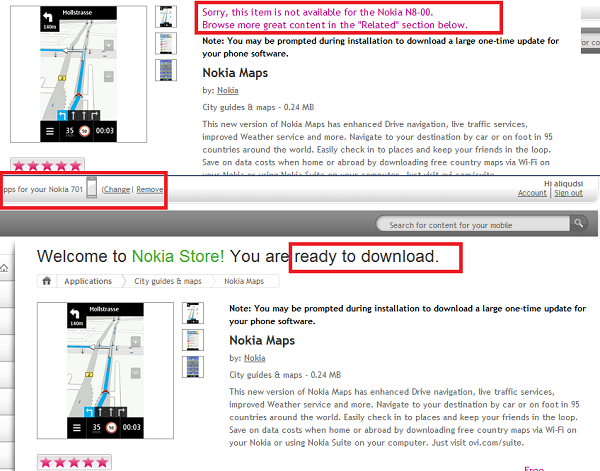
Nokia Maps (previously Ovi Maps) has just been released from the super amazing top secret beta labs over to Nokia store, Except it’s only for Belle devices!? When I tried downloading it over the PC with my phone set to ‘N8′ it said the application wasn’t available; however if you simply change your device to any Belle device (Eg: 701) it’ll download just fine, and install perfectly. (note: I’m running Belle on my N8 so not sure if it’ll work for those on Anna or previous versions.
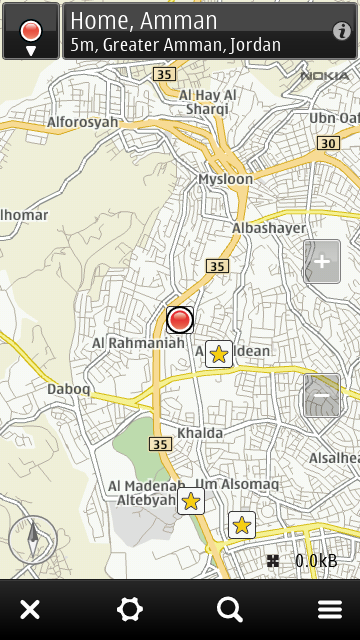
One of the changes I spotted was the addition of the ’Belle style taskbar’ at the bottom of the screen:
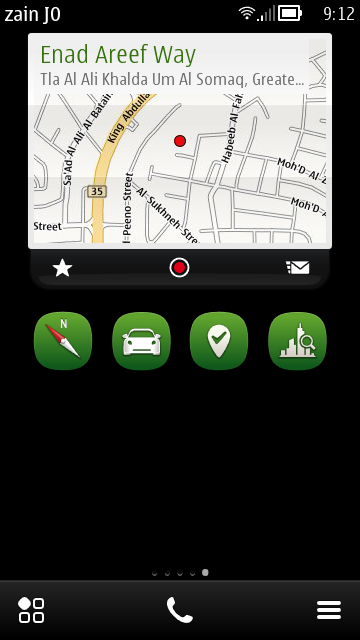
Another pretty nice feature is a new home screen widget that shows you your location and gives you the ability to check-in/Email your location directly from the widget. (I’m not sure if this is new, but it’s the first time I see it.)
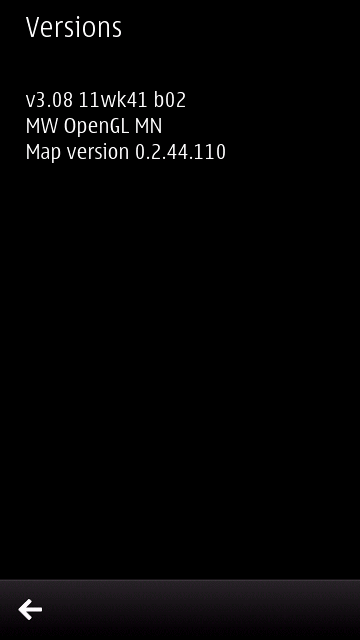
Version number remains unchanged as the previous release (still 3.08).
For those of you running Belle (officially) run over and get it from the store:
For the rest of you who want the installer file just set your phone as Nokia 701 and go to this link:
http://store.ovi.com/content/214239/Download
IMPORTANT: Some readers are reporting that installing this version on their Symbian Anna phones completely ruins the map apps, solution is to delete EVERYTHING related to Nokia Maps then reboot & reinstall 3.08 from beta labs. ONLY FOR BELLE!
I think that’s about all that’s new, difficult to tell as their is no change-log, but if you notice anything else let us know.
Category: Applications, News, Nokia, OVI, Symbian, Symbian^3
About the Author (Author Profile)
Heyyo, names Ali- Currently a fourth year Dental Student from Chicago; studying in Jordan. I love all sorts of gadgets almost as much as I love my cookies! (Have: Green Nokia N8, Cyan Lumia 800, Black N9, Stormtrooper White Lumia 900, Black 808 PureView, Red Lumia 920). Follow my twitter handle '@AliQudsi' - no pressure. Thanks.Comments (46)
Trackback URL | Comments RSS Feed
Sites That Link to this Post
- Nokia Maps v3.08 with Homescreen Widget now available at Nokia Store (Symbian Belle Only) | SymbianTweet | November 6, 2011
- Nokia Maps Disponibile per Symbian Belle | November 6, 2011
- Neue Version 3.08 11wk41 von Nokia Maps « S60inside | November 6, 2011
- Aktualisierte Nokia Maps 3.08 für Symbian Belle im Nokia Store verfügbar | November 6, 2011


Now I just need the official Belle for my N8…
Be careful – Doing the download and installation on an Anna device gave me “Feature not supported error”
Have to uninstall all maps software to reinstall 3.08beta from beta labs
Haha, can’t uninstall… What have I done! Will have to reset…
Try ging to application manager and uninstall everything that contains maps (especially maps engine)
No, they don’t appear there any more… Gone!
How can i get back to the normal maps? same error appear “Feature not supported ”, I HEAT any update again from OVI.
that widget is neat
maybe that’s why it needs to be belle?
I think Belle requirement is probably because of UI inside the maps itself, not sure.
well the only thing that seems really different and that which we’re incapable of doing on Anna is the double-bar height of the widget
either way hope we get our belle asap -_-
I tweeted Nokia, asking for any Belle roll out date.
nokia Nokia
@
@KobusNell It will be on the way for the other phones running Symbian Anna, but we don’t have a date to share just yet
I hate this installer
agreed
How can i get back to the normal maps? same error appear “Feature not supported ”, I HEAT any update again from OVI.
Can I set a route with waypoints or route from point A to B?
Working on my Custom Belle Firmware for N8 =)
I’m currently using The One’s Belle firmware after running the stock leaked Belle since August. Will your CFW be on daily mobile as well?
where will you post your cfw?
i hope this means new social app with new widgets will come out soon.
after anna my device never show my exact location can anyone tell me what could be the problem…it always says your location within 350m and drive also dosent works
Try activating A-Gps for the first time, until you get accurate reading.
Updated maps to Nokia maps for my 701. There will be 5 extra separate menu icons for map loader, check in, drive, weather and Guides and with two homescreen widgets.
Nokia maps is amazing.
thanks for the link. I am trying to install on my belle N8 now. I hope this works. I currently have v3.08 plus all that Nokia map suite stuff
installed and I love it. Thanks for the download link
Does it fix the battery drain issue that affected the beta version where the app would refuse to go away from the background even after closing and slowly suck out all the battery, not unlike a parasite?
If you installed this version on your Symbian Anna device and messed up your installation of Nokia maps then follow this guide to recover everything back.
1. Download and install an old built of Nokia maps 3.08.
2. This is a full installer and not net installer.
http://www.fileserve.com/file/nEzUEKH/Nokia maps 3.08.sis
This means that all the apps will be replaced during installation with an old version of app. Online install doesn’t do this as it finds a newer or same version already available and skips its install.
3. Once you have installed the old version, start “Maps” again. It should work the way it used to.
4. Now, download the officially available Nokia Maps 3.08 latest beta for Symbian Anna from here. http://betalabs.nokia.com/apps/ovi-maps-for-mobile-v3-08
5. Install the latest beta. This will be an online installer and will update all apps.
6. Reboot and everything will work fine. Verify by running all apps, one after the other.
Thnx !!!
))
You are great man
I’ve fucked up my system, even Nokia store won’t started after belle kind of update. Now it’s perfect after yours advice
And i have 105 MB free C: after hard reset,
Thank you very much for your help Saurav. I followed your instructions and got my maps in my N8.00, with Anna installed, working again after doing the automatic update from Nokia.
Thank you so much Saurav. Maps now work again on my N8
No luck with that too.. cannot install any previous versions.. Any other options? Am pissed off already!
i’m having a problem during the installation, “network error, try later”. how is it possible? i’ve had this error since yesterday…
hi everyone…can i knw where can i get symbian belle for my e7….plz….
can i get a leaked one…
yea, go to dailymobile.se
http://mobilesunleashed.net/
its awesome. i like the location widget, and honestly if you have the map widget you dont need the map apps widget bar, cos once you clickt location widget you can navigate to whereever from there
I have Symbian Anna on my N8 and after the update of Nokia Maps yesterday, Maps did not work anymore and threw the error “Feature not supported”
The steps described above by Saurav Srivastava (November 7, 2011 at 5:39 am) worked perfectly to solve this issue.
I only had to search for the way to get the .sis files installed on the new Nokia Suite. It was not clear but I found it: just drag the file to the icon of your connected device in Nokia Suite!
@Nokia: why on earth is the update possible on Anna? This should not be blocked!
@Nokia, there should be a visible and obvious way for users to install apps using Nokia Suite. I mean via a menu option and not only via drag and drop to the device icon.
I love my N8, but Nokia should do a better job here.
Here is the solution again (short version):
1. Download and install an old built of Nokia maps 3.08 from here (full install):
http://www.fileserve.com/file/nEzUEKH/Nokia maps 3.08.sis
2.Once you have installed the old version, start Maps again. It should work the way it used to.
4. Now, download and install the officially available Nokia Maps 3.08 latest beta for Symbian Anna from here (This is an online installer):
http://betalabs.nokia.com/apps/ovi-maps-for-mobile-v3-08
Just check software update apps on my N8 today. N8 show me Nokia Maps – with enhanced Drive navigation & the version number is 3.8 (104). The size just 16MB. My N8 running Anna, is this version compatible with Anna??
i just updated my maps (3.08) with nokia suite to E6. its working fine great interface.
my gps doesnt work after symbian belle update rest all works fine but gps couldnt find my location
anyone please help…
my gps doesnt work after symbian belle update in nokia c6-01 rest all works fine but gps couldnt find my location
anyone please help…
I can download maps with Nokia Maps Suite Italy, Austria, Germany, …. why?
- Even though I have all returned to the factory default formatted so it is impossible to download a map!
Does anyone have the address to turn the Nokia personally!