Your Ad Here

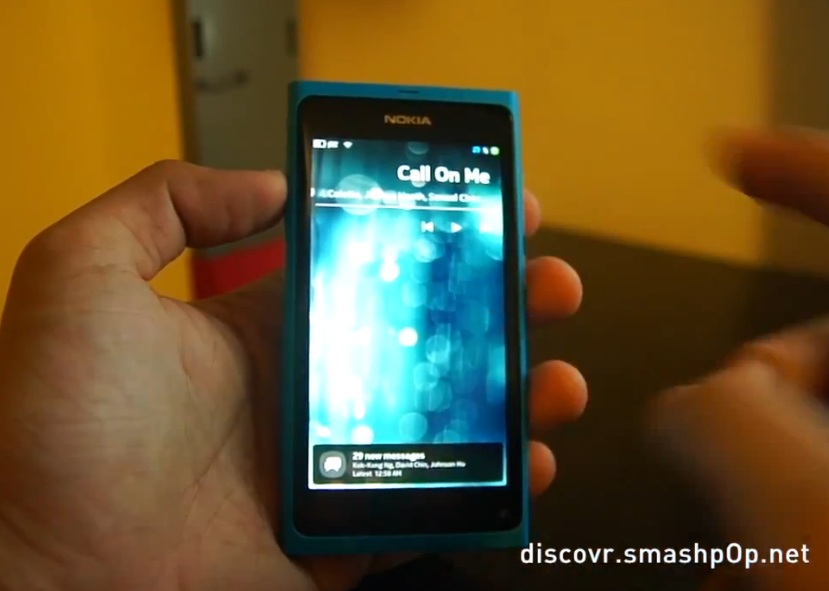
Video: Nokia N9 PR1.1 Update demo: Music player lock screen controls, camera filters, swype keyboard and more

| November 17, 2011 | Comments (37)

Jason of smashpop takes a look at the Nokia N9 firmware update

  • Music player improvement – with lockscreen music controls.
  • Camera improvement with photo filters.
  • Swype keyboard. (Was swype not there already? I thought there was a video during the launch batch that showed swype)
    • When activated you can then quickly switch from normal keyboard to swype keyboard with a swipe (as usual in N9 from switching keyboard languages)
  • New notifications on standby
  • Easier to quit apps – more smooth (swiping from top to bottom – was this already there too or was it another gesture?)
This is the official changelog:
  • NFC tag reading to instantly interact with NFC tags
  • Music controls on lock screen
  • Photo and video shooting with color filters: black & white, sepia, vivid, negative, solarize
  • More powerful multitasking with improved memory handling
  • Swype for fast typing
  • Faster MfE synch, synchronizing only active folders
  • Noice cancellation reduces background noise so that your friends hear you better
  • Close apps easily with swiping down, this now on by default
  • New indicators for standby screen like charging and calendar
  • etc

Video  by 

Cheers AmmAR for the tip!

Category: Maemo, MeeGo, Nokia, Nseries, Video

About Jay Montano: Hey, thanks for reading my post. My name is Jay and I'm a medical student at the University of Manchester. When I can, I blog here at mynokiablog.com and tweet now and again @jaymontano. We also have a twitter and facebook accounts @mynokiablog and facebook.com/MyNokiaBlog. Contact us at tips(@)mynokiablog.com or email me directly on jay[at]mynokiablog.com View author profile.

Comments (37)

Trackback URL | Comments RSS Feed

  1. dans says:

    Easier to quit apps – more smooth (swiping from top to bottom – was this already there too or was it another gesture?)

    Now its on by default.

  2. Michael Faro-Tusino says:

    Has anyone found Smart Dialling on PR 1.1? I can’t find it, but it is featured as a function of the N9 on Nokia Australia.

    Screen shot – http://i.imgur.com/KD9hK.jpg
    Site – http://www.nokia.com.au/find-products/all-phones/nokia-n9/specifications

  3. ddd says:

    worth noting is the addition of chinese input in pr1.1

    i also saw landscape mode for three home view in n950. will it be available in pr1.2?

    nokia should include nokia internet radio in the next firmware update, nokia world clock, nokia city scene,nokia sliding puzzle are also found in ovi store and made by nokia themselves

    • Michael Faro-Tusino says:

      Landscape mode is a “hack”. You need to edit a configuration file. Check the MeeGo forums :)

      I did it a while back, but I found an icon rendering issue occurs, in which some icons are missing until you swipe to a different homescreen.

  4. realtechie.. says:

    i have seen a chinese 1.2 pr2 video demo which i posted in tips section also the landscape mode war there in it.

  5. Johnsnipe says:

    i want msn and skype support :( i hope to see them on a future update

  6. Jesse says:

    Why is it so laggy… Every video I see people have to swipe like 3 times to actually get it to swipe. Ugh.

    • BellGo says:

      Well I can assure you this is not the case. Maybe they don’t yet know how to swipe, but if one does it is instantaneous.

      I learned it in 5 seconds. (And I am not joking)

    • Hobospy says:

      I was also worried about this before I bought my N9 but after using it for a few weeks now I can honestly say there is no lag. I do find I need to tap the reply field an extra time for it to register when I am replying to texts but apart from that a really easy and great looking phone to use.

      • Michael Faro-Tusino says:

        Same here, I learnt how to tap it correctly finally :) Took only a month :p Use the tip of your thumb, dont use it flat

    • Cod3rror says:

      Swipe UI seems great in concept but it seems to be a hit and miss in practice.

    • ssdh says:

      It’s a bit difficult to use when you are trying to record and demo it in front of a camera in that position, but it’s easy to use in real life normal situations.

  7. nabs says:

    I wish there was font size adjustment improvement. The N9 fonts are small for me but I am not visual impaired; I just like larger fonts. Even iPhone and Blackberry have, why not N9?

    • Sammyl says:

      Pr1.1 has larger font in both messages and contacts apps. There is also a new article on N9 development blog regarding larger font in up coming firmware update.

  8. boyang says:

    didn’t get the OTA update, the NSU doesn’t recognize phone as well..

  9. [...] Link Teilen Sie dies mit:TwitterGefällt mir:LikeSei der Erste, dem dieser post gefällt. [...]

  10. wes? says:

    so sad. it would buy one directly now if it just had a cam about as good as my N8′s – basically just Xenon missing…

  11. Spinnel says:

    Why is it so laggy? D:

  12. Grazy says:

    I have a denmark handset and i still have not got this update! it’s really annoying! tried Nokia updater and OTA but nothing is coming up!

    • Hechicera says:

      Same for me. I also have a N9 from Denmark and still no update. Not OTA and not through the software updater:-(
      Apart from that I am very happy with my N9.

  13. Doug says:

    Are they kidding with those music controls? I’d love to know who the bozo was who decided not to make them touch friendly by using the width of the screen to spread them out.

    • Ryan says:

      It’s so you can get to it utilizing only one hand. Which is the whole idea behind swipe to be able to use as much of the handset as possible with only one hand.

  14. MoritzJT says:

    OTA update or via NSU sucks. It slows down your device, sometimes failes to flash the new Kernel.

    I did a complete reflash with full rootfs and emmc file via WinFlasher or it’s companions. Worked like a charm, got a faster N9 than with PR1.0

    Worth the effort!

  15. usino says:

    shame nokia is the same nothing will change in Global.

  16. Tiago Silva says:

    Swype was not in PR1.0, I tested it at the shop.

    Does it show upcoming Calendar events already (in the Notifications view or the lock screen) ? That is even more important to me than Music controls in the lockscreen and is one of the reasons I still haven’t bought one. Did I miss how to do it?

  17. Tiago Silva says:

    Swype was not in PR1.0, I tested it at the shop.

    Does it show upcoming Calendar events already (in the Notifications view or the lock screen) ? That is even more important to me than Music controls in the lockscreen and is one of the reasons I still haven’t bought one. Did I miss how to do it?

  18. Tiago Silva says:

    Swype was not in PR1.0, I tested it at the shop.

    Does it show upcoming Calendar events already (in the Notifications view or the lock screen) ? That is even more important to me than Music controls in the lockscreen and is one of the reasons I still haven’t bought one. Did I miss how to do it?

  19. Tiago Silva says:

    Swype was not in PR1.0, I tested it at the shop.

    Does it show upcoming Calendar events already (in the Notifications view or the lock screen) ? That is even more important to me than Music controls in the lockscreen and is one of the reasons I still haven’t bought one. Did I miss how to do it?

    • Trexus says:

      There’s two apps for that already, one is much better than the other.
      check-out my-meego.com or n9-apps.com (still building it’s list).

  20. Tiago Silva says:

    Ooops sorry!!!

Leave a Reply


If you want a picture to show with your comment, go get a Gravatar.