
#N9Hacks: Hide App Shortcuts + Enable Terminal without Dev Mode (Terminal)
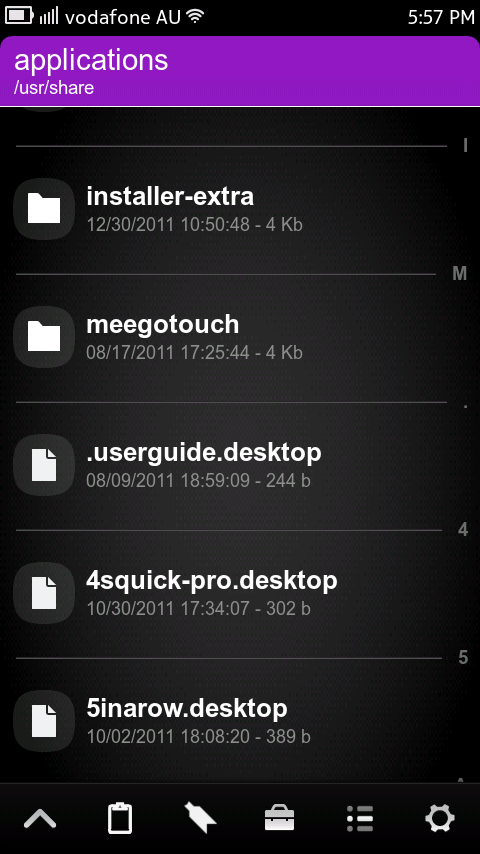
Do you have pre-installed apps you never use but can’t delete? App icons taking up too much space?
I know I never use User Guide and it is just sitting there taking up icon space. I used Terminal to hide it, by making the shortcut a “hidden” file. Here’s how; (Obviously replace userguide with the name of the app. To find app name, use ls after step 2, providing list of files in the directory.)
- Gain root – devel-su
- cd /usr/share/applications/
- mv userguide.desktop /usr/share/applications/.userguide.desktop
- Reboot if needed
Many people are still cautious when using the N9 in Developer Mode, due to SSH-ing into the device etc. (Pr 1.1 helped a bit by disabling root access, but it still isn’t too hard to get around it.) I don’t really care about developer mode or not. I only use it for Terminal. So when I came across this little trick, I tested it, and love it. This part can be done either using FileBox or Terminal.
Terminal Shortcut without Developer Mode:
Using FIleBox
All app shortcuts are stored in /usr/share/applications. If you have FileBox (other file managers may work), go to settings and enable “show root filesystem” and “show hidden files”. Enable Dev Mode first, then go to the above directory, and copy meego-terminal.desktop to /home/user/.local/share/applications (NB: If it doesn’t exist, create it.) Rename the file to Terminal.desktop. Disable dev mode, and Terminal should still be there.
Using terminal
- Gain root access Devel-Su pass is rootme
- cp /usr/share/applications/meego-terminal.desktop /home/user/.local/applications/share/Terminal.desktop
Like always, if you need help, drop your questions in the comments below or give me a shoutout on twitter.
Michael
About the Author (Author Profile)
Hi! My name is Michael. Like the others, I'm also a Student, living here in Sydney. I have a real passion for the latest technology and I'm a real Nokia buff! My aim is to keep those of you, like myself, updated with the latest in what's going on in the Nokia World. Currently sporting N9 & Lumia 820, with other Nokia devices in my posession. Get in touch on Twitter via @MFaroTusino, Google Plus or even simply drop me an email at mike.mnb[at]outlook.com or tips[at]mynokiablog.comComments (32)
Trackback URL | Comments RSS Feed
Sites That Link to this Post
- N9Hacks: Hide App Shortcuts + Enable Terminal without Dev Mode (Terminal) | December 31, 2011


How-to video?:)
Step by step guide in video format is easy
I get error: no such file or directory, but when I use filebox to enter the directory, I can see the userguide.desktop file
$ devel-su
Password:
BusyBox v1.19.0.git (MeeGo 3:1.19-8+0m6) built-in shell (ash)
Enter ‘help’ for a list of built-in commands.
~ # /usr/share/applications|
> mv userguide.desktop /usr/share/applications/
.userguide.desktop
sh: /usr/share/applications: Permission denied
mv: can’t rename ‘userguide.desktop’: No such file or directory
~ #
but you can see the file in folder:
http://dl.dropbox.com/u/17400628/2011-12-31_11-24-16.png
Can somebody tell me what’s wrong?
Don’t use the | shortcut in code, right it all out
Could you tell me what to type pls? If i put / in stead of | it says permission denied..
Use devel-su first to become root, then try renaming it.
That’s what I did.. devel-su and password rootme (didn’t change it and doesn’t mention wrong password)
Weird… Can you give us a listing of the file attributes / ownership? To do so, type: ls -l /usr/share/applications/userguide.desktop
Also, what do you get when you call: whoami
whoami => respons: root
The Is line: Is: not found
It’s not `I` (capital i) but lowercase `L` in the command. The command `ls`: http://linux.about.com/od/commands/l/blcmdl1_ls.htm
Did u make sure you put a space after userguide.desktop and /usr/share etc.
yes, that’s not cusing the problem.. I’m having troubvle with step 2 I guess
Hey bro you know how to install skype in the N950? I tryed with a hack but it´s very very complicated, please help!
Download N9Tweak from N9-Apps. One of the hacks is allowing for Skype on N950. Haven’t tried as I have no need, but that is your best bet
among all these mods available for n9, i only find two mods useful and issue-free.
those are
landscape mod and clock color changing
i hope next firmware can include the above mods.
@ incognito
sorry, my mistake about the l vs I
here it is:
~ # ls -l /usr/share/applications/userguide.des
ktop
-rw-r–r– 1 root root 244 Aug 9 10:59 /usr/share/applications/userguide.desktop
~ #
Then it’s pretty weird that you get `Permission denied`. Are you sure you’ve typed it correctly:
mv /usr/share/applications/userguide.desktop /usr/share/applications/.userguide.desktop
?
(Hint: you can use tab to autocomplete parts of the path)
ok, this one worked.. I’m using tab, but didn’t type the whole path for the first file.. will test with other icons now:)
Thx alot!
haha great.. cleaning app icons now.. byebye youtube and other shit;)
If you don’t want to type the whole path, first change your working directory with:
cd /usr/share/applications
Then you don’t need to use the path at all, i.e.:
mv userguide.desktop .userguide.desktop
Keep in mind that you can use . in front of file and directory names to hide them from indexing in other apps as well – for example you can hide your music, videos or images from showing up in the music, video and gallery apps.
Great.. Do you know how Ovi Music is called Can’t seem to find it in that folder
I believe it is Morpheus
You are right, it worked.. thx guys, really good support!
I’ve got a problem that’s bugging me for this past 2 days.. As the memory for installing application is limited to 4.2gb on my black 64gb N9, I’m already breaching that limit (3.9gb) hence i can’t install any new apps no matter how small its size in relation to mb left for installing an app.
And the problem got worse coz I can’t even uninstall any of my current apps, no matter what size they are, like the N9tweak(20+kb) or GTRacing (360.3mb). Message I get when trying to uninstall from app manager is ‘ Can’t delete. Please restart device and try again. If problem persists, please contact application developer for assistance.’ When I long press an icon n click on the red X, message ‘ Installation failed. Not enough disk space to install app. Uninstall other applications to free some disk space.’ But I’m not trying to install the app!!! Am I stuck here forever or is there a way out of this, other than reflashing the device? And is there any way that I can increase the partition for installing apps? Thanx in advance guys and have a Happy New Year..
Try from the terminal:
devel-su
(enter your password, or the default if you haven’t changed it: rootme)
apt-get autoclean
apt-get autoremove
apt-get clean
Post your the output of command: df -h
Prior and after the above commands if you can’t still uninstall an app.
Sorry, I dun quite get what u mean on the last part.
Post your the output of command: df -h
Prior and after the above commands if you can’t still uninstall an app.
Its ok.. I tried using dpkg -r GTRacing and it worked.. Thanx again incognito..
Hey Michael,
Great posts recently. Keep it up. Now that I’m back from vacation and got PR1,1 using NSU, I’m gonna try some of these.
On the hidden icon hack, what do you do to unhid them if you change your mind?
i’m trying to hide a app “obm-music shop.desktop”
Gain root – devel-su
cd /usr/share/applications/
mv obm-music shop.desktop /usr/share/applications/.obm-music shop.desktop
doesn’t seen to work
I am certain it’s because the space, i have hidden apps without spaces within their names, however with the ones with spaces eg “Optus Zoo” it doesn’t seem to work
I’ve been browsing on-line greater than 3 hours lately, yet I by no means discovered any attention-grabbing article like yours. It is beautiful price enough for me. In my opinion, if all website owners and bloggers made good content material as you probably did, the net might be a lot more useful than ever before.