Nokia Updates Have Permission to Modify Root Storage in WP8?
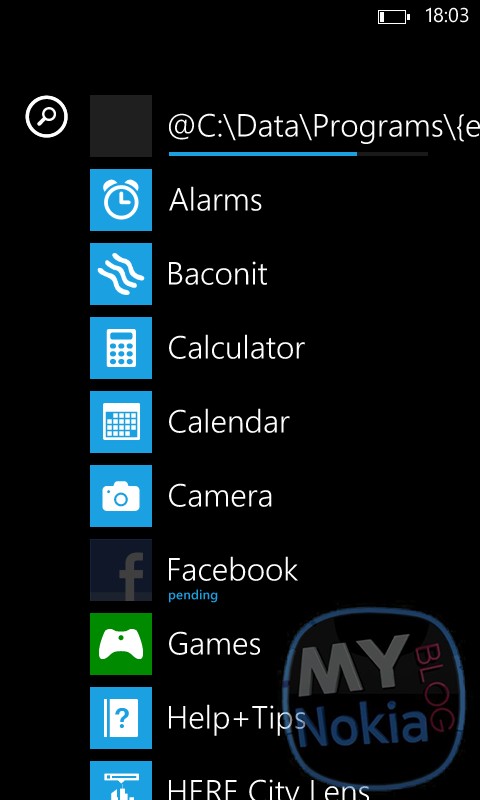 I’ll be honest; I’m not exactly sure exactly what the screenshot above means. As I was updating my Lumia 820 (it suddenly decided to receive a billion updates from Nokia- 1, 2, 3) I noticed the weird text at the top of my app drawer. “@C:\Data\Programs\….” which sounds a lot like what I see on my PC, these came up every time one of the Nokia feature apps were being updated, such as Display & touch, Network +, Extras + Info..
I’m not sure exactly what this means, besides the fact that a lot of these bug fixes and improvements that have been coming from Nokia are accessing the root storage and modifying system files on WP, and maybe even the chance of future proper file management? But then again I really don’t know much about how this stuff works to be honest.
Category: Lumia, Nokia, Windows Phone

About the Author (Author Profile)
Hey, my name's Ali- Currently a fifth (and final) year Dental Student from Chicago; studying in Jordan. I love all sorts of gadgets almost as much as I love my cookies! Be sure to follow my Twitter handle @AliQudsi and Subcribe to my Youtube for the latest videos - no pressure. Thanks. Since my days as a avid Nokia blogger I've completed my studies and can be found doing Oral surgery realted stuff here!!Subscribe
If you enjoyed this article, subscribe to receive more just like it.


Connect
Connect with us on the following social media platforms.