
Camera Update for Nokia N8! 30FPS, Continuous Autofocus, faster Cam UI!
Quick, go get it! (You MUST have Symbian Anna first! It may work with leaked Belle, but not with PR1.2 and below)
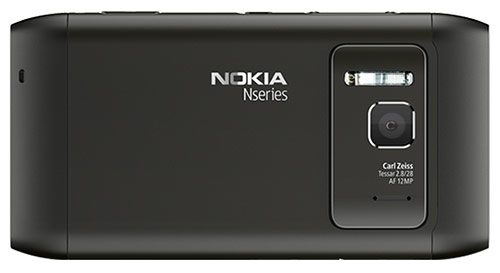
Nokia Conversations and Nokia Beta Labs has some great news for N8 users. Just as Damian Dinning promised, a N8 specific update after Anna to come and give your camera some extra love (hence why N8 site at the time said Anna but still 25FPS).
This application is an upgrade to the built-in camera application, for your Nokia N8. It will look familiar to you, no doubt. It’s still the great N8 camera, providing superb results. We’ve just made it a little better by making some of the improvements we didn’t manage to squeeze into the Symbian Anna release.
- We tweaked the UI, to provide camera aficionados faster access to essential camera controls
- We improved the quality of recorded videos, by cranking up the video recording speed to 30 FPS and adding the heavily requested continuous auto-focus.
We’ve spent a lot of time optimising the code here to make the video smooth and frame-rate stable. This allowed us to increase the video frame rate to 30fps and achieve excellent stability. Using the older code resulted in less stable frame rates. Using the Beta Labs application you’ll get 30fps in auto mode. This provides significantly smoother videos, especially during panning. There’s been a lot of online discussion around whether 30fps is really needed given movies are shot using 24fps.
With movie cameras the time interval between each frame is extremely short compared to the time the shutter is open. Whereas with electronic shutter-equipped devices such as the N8, the interval between frames can easily be greater than the time the sensor is exposed. By increasing the frame rate with such devices, the interval between frames is reduced resulting in smoother video.
There’s a lot of work done to improve the N8 camera. Damian did not just want to complete tick boxes. He is an avid perfectionist in imaging and will not settle for anything less than imaging done right.
They’ve implemented a way to cut the noise produced by continuous AF.
To combat this issue, we’ve also developed a noise filtering system which specifically extracts the noise pattern the piezo lens drive emits from the audio signals. It works similarly to noise-cancelling headphones. This took quite some time to get just right, as we didn’t want to impact the already excellent audio recording capability of the N8, still one of very few devices which record audio with a stereo ambient audio track.
Oh and in video, they’ve added grid lines to help those wanting to shoot in the 2.39:1 cinematic aspect ratio.
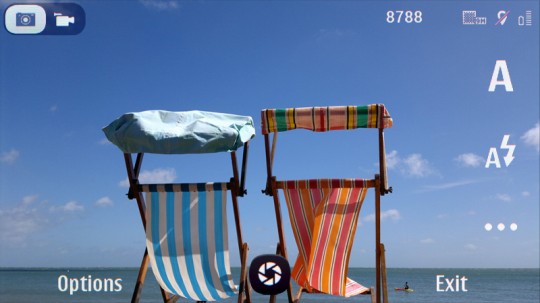
Camera video switch on left.
Well there goes my need to buy a compact cam for close up video to replace the one I broke :S (it did some sort of suicide jump at a camera shop when I bought a 60D, which unfortunately as you may have noticed in our recent blurry vids, DOES NOT have continuous AF
)


hey some info from nokia betalabs
Note !
Due to a configuration mistake, the current package is set to record videos at 25 FPS, not at 30 FPS. We are really sorry about this mistake and are working hard to address it. We will update the package very soon with the 30fps functionality enabled, please stay tuned for the update.
LOL… Nokia, Nokia.
This says servant of company that never made mistake! Hahahahahaha! Apple is a king of phones with best antennas! Hahahahahaha. Cod3rror, you are such an idiot! Hahahahahahahahahha
Wonder how long it will take until they’ll be able to actually deliver what they’ve promised (30fps recording)
too bad there’s no touch to focus in the new UI.
Touch-to-focus is just a fad. There is a proper shutter key.
Honestly i think i suck at holding my N8 still while taking photographs and the touch to focus on camera pro actually helps me out quite abit as i tend to shake my hands abit while pressing down on the camera button. Kinda hope they’d have this in the official camera app too.
Does not work with Belle.
After restarting the device, the camera UI doesn’t open.
Don’t install this, just uninstall and read the previous comments concerning the features in Belle.
I have belle and I can confirm 30 fps (without betalabs update).
I have pr 1.2 and my camera update was successful…. Wrong about only for anna devices
This is relayed directly from Nokia.
“Compatibility
This camera update is for the Nokia N8 with Symbian Anna”
it bricked my camera on pr 1.2:http://betalabs.nokia.com/apps/camera-update-for-nokia-n8/discussion/37636/camera-stopped-working
Don’t suppose this gives us US peeps the ability to turn off the shutter sound/camera tone for both pics & vids?
I’m guessing it still won’t allow you to disable the LED video recording light
For recording things such as classical music concerts where ambient lighting is near black, and stage is lit. It can be extremely distracting for performers to have a light beaming at them like The Borg from some person in the audience.
use some electrical tape over the light
Camera app updated again, 30fps working now.
The Camera app just got updated and fixed now (30FPS is working now, check the link) however . it’s more buggy now, i went back the older update due to its crashing
Dear nokia,
The updated .SIS is buggy very buggy compared to the first one which lacked the (30FPS configuration) . we’re unable to access the Settings icon when shooting a still picture, however we’ve managed somehow to change the mode from image to video ( after crashing many times due to the old installation that wasn’t removed).
Please take another look at the new updated software and help us as soon as you can
the UI is SuperB , it’s more faster now more convenient , we really would like to see some improvements On Nokia’s N8 ‘Still-Shots’ .
Thank you very much ..
Mike
So jay ? got a chance to dive with your N8 ?
No unfortunately, my N8 refuses to find the Anna update and I’m not trying this without Anna (So to fairly assess any bugs).
Oh . have your tried Nokia software updater ?
Good luck with it Jay .. Anna is great ! but not as good as belle though hehe
Cheers !
improvements on the still shots? oO like?
i tried the update too and yep crash crash crash -_- when trying to go to the video camera
Camera update working OK on my N8.
No bugs or crashes …… so far.
how do i check on my phone if its 2 or30fps
I installed the update and there’s no continuous AF in video mode, but at least it records in 30FPS
I hope they will hurry with that, i want badly that feature
ok folks I have to correct myself… select “Close Up” mode to enable Continuous AF
Fantastic goods from you, man. I’ve be mindful your stuff previous to and you’re simply extremely magnificent. I really like what you’ve received here, really like what you are saying and the best way through which you are saying it. You’re making it enjoyable and you continue to take care of to keep it wise. I can’t wait to read far more from you. This is actually a wonderful website.
Hi. ive just brought this phone. despite spending hours on the Net please can you tell me how to use the autofocus on the camera. Ive updated the phone via the nokia PC suite but how to (a) know that the phone has the latest version of the OS and (b) use the autofocus feature, thanks
First you have to download the update from the betalabs site, the link is up at the top of this page. Also, someone correct me if I’m wrong but the autofocus only works for videos, not pictures. Check out the reply from DarkSoul, two posts up from yours.