
Videos: Official Continuous Autofocus Video demoes on Nokia N8
Note, by official, we mean official feature from the update, not that these are demoes from Nokia.
This morning, some N8 Symbian Anna owners got the official camera update for the N8, bringing most importantly continuous autofocus and 30FPS video. With the latter, video panning and particular, video with motion should look much smoother (though we’re not sure this has been activated, some reports still say 25fps). With continuous AF enabled, you can record things close up or far away and not just be stuck with blurry images when ever you want to look at things up close.
We’ve had this capability for a while now as a hack for the Nokia N8, but it also became available as a feature on a camera app. Now, it’s officially here for your N8 (and with a way to combat AF mechanism sound apparently) from Nokia’s beta labs.
Here’s the first demo and it looks to perform quite well. I haven’t tried this myself as my darned N8 still won’t see the Anna update (through any of the update methods) that is supposedly required before getting the app from Nokia Beta Labs which improves the N8′s camera abilities. This will become particularly useful when recording gadgety demoes where you have close up items that move within narrow depths of field – the N8 can thus continue to record and adjust to new focus points. What is really useful is how small and light the N8 is, so it’s easy to handle one handed whilst holding the gadget with the other hand.
If you have any samples of your own from the official N8 update, we will add them to this post if you wish.
http://www.youtube.com/watch?v=G5NFo3wt_AU
Video by WorldofPhones
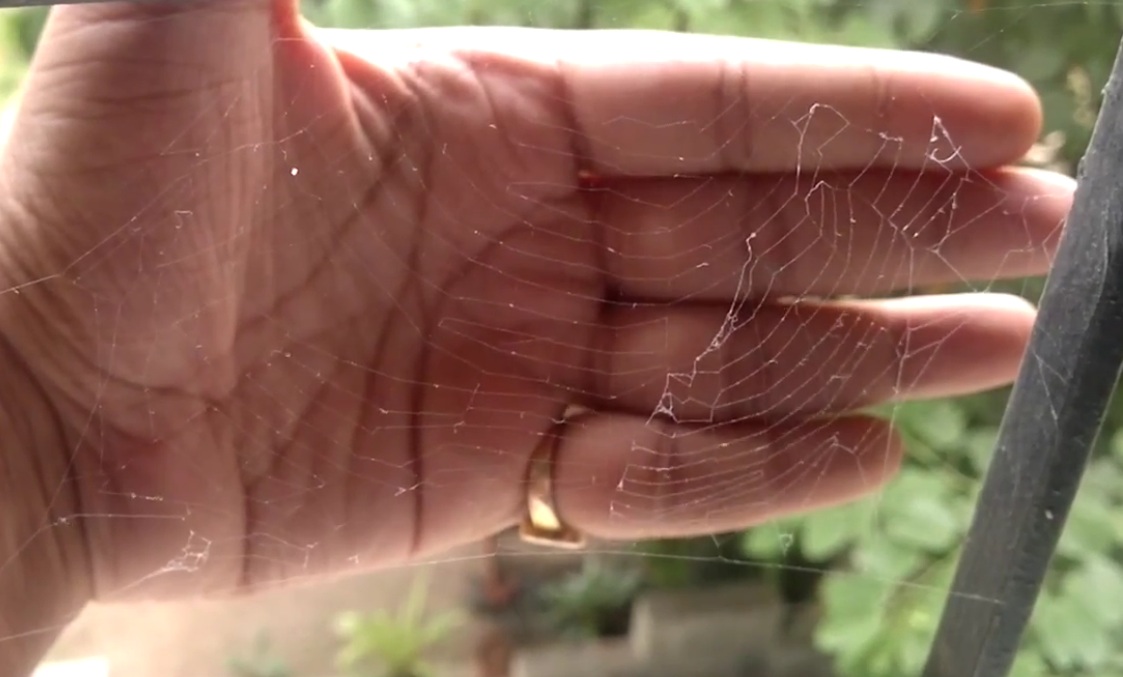
You can see it’s much faster in this demo. It has more natural depth variation than the first one with cobwebs and a hand (where it could have been trying to focus on railings).
Here it’s quite dark but the N8 is focusing quite quickly.
http://www.youtube.com/watch?v=v8NQjlI0BVI
Video by donpipino
This one looks really good. Could rival Topolino70′s work with this macro snail. Excellent use of digital zoom (which as we know retains quality) zooming in even further!
http://www.youtube.com/watch?v=sC-VyCPXars
Video by Hardtothinkname
Flowers
http://www.youtube.com/watch?v=NNzYt_B50tU
Video by imoka2
Starts in black and white. I suspect some smudge is on the camera due to the flaring on screen.
http://www.youtube.com/watch?v=56SBfCY_7cg
Video by kishorat
Note, be careful when going too close, the N8 will not focus. This is the same with all CAF cameras. Just move back a bit and then move forward.
http://www.youtube.com/watch?v=gaA9iSXTB8w
Here’s a demo of the actual camera UI
http://www.youtube.com/watch?v=d1PW0PIigYw
Video by Michael322222
Wow, great job by Damian Dinning and team. Looks like even better CAF than my megazoom. Well the spare one anyway, the other one as previously mentioned is dead, but now doesn’t need replacing as this seems to do a great job.
Category: Applications, Nokia, Nseries, Symbian, Video


It’s still only 25fps i’m afraid. Beta labs made a statement saying that the app has been misconfigured and they will release the updated app as soon as possible.
Woho, my video
As you said, the videos are not 30 fps yet, and Beta Labs have now posted an update to their page confirming this.
When will people finally realize that beta apps NEVER come through official update channels… and the writer of this article here should have known better.
It’s a beta app. Therefor you can only get it from the beta labs website!!
Yes, that’s an official hub for supported Nokia apps.
No it’s not… check your source… the camera update is only from betalabs
That’s what I mean. It’s from Nokia Beta Labs. It’s NOKIA supported app. Not some hack or a 3rd party app at Ovi Store. Sorry for confusion.
Ok I see now. My apologies also.
I’m just stating this because I’ve noticed that many people are expecting this through the software update tool and complain that they haven’t received this camera update through the Software update too yet.. and finding that weird.
And now here you write:
“…. I haven’t tried this myself as my darned N8 still won’t see the update (through any of the update methods)”
Therefor I thought you were expecting this camera update through software update tool/suite while actually you meant the Anna update and not camera update.
nevermind…
It was wrong from Jay’s side to write “…. I haven’t tried this myself as my darned N8 still won’t see the update (through any of the update methods)”
it sends a wrong message to the reader, making him expect this to be a final mass-update expected to make the N8 camera better, just like anna.
It’s still beta, for some reason. so let’s keep it Beta
I’ve updated the post to make it clearer. This was done v quickly during breaks so as I could get post published and shared.
great job, jay
my caf works and i assumed so was my 30fps
but when i moved a video over to my computer i noticed its still 24fps :/
ah well the other updates like the UI are appreciated
i didn’t get even continuous auto focus also why?please help.
Me too, no continous autofocus. they screwed up 30 fps in some and CAF in some. irony is that i get what seems 30 fps. the video seems smoother. but ic ant assure its 30 fps technically. it was smoother than before
Me too! I’m recording at 30fps, but continuos AF dont work. I uninstall and reinstall the app, nothing results. 30fps is OK, but CAF dont work.
continuous autofocus is only in close up mode.
Again, as I have already said, this update is working for PR1.2.
I don’t have Anna, I simply installed this and it is working just fine.
Update to my previous “hey it’s working on PR1.2″: yeah, it’s working, but the actual auto focus code and everything else is apparently an Anna feature obviously not available on PR1.2. All of the videos showing Anna with CAF look a hell lot better than mine (using PR1.2 + camera update)
Where is the update to anna browser for x6?
Would be great if they could add focus shifting and the ability to change shutter speed so we can do some nice photos
Hi I am stuck and need help in updating Anna. It has been days I am trying to update through OVI PC suite and package downloaded but right after it restart the handset for first time it says “Lost connection to the device” and I did every thing during last 4 or 5 days but no progress onward that point. I even reset the device and tried with same problem. I updated the OVI suite from scratch but same result I remove and reset every thing and tried but no luck.
What am I missing or what are my alternates? I didn’t get OTA option in my device update. Please help me out?
Hey
try Updating your phone with Nokia software updater
i used it to update
http://betalabs.nokia.com/apps/nokia-software-updater
i’ve been through some of ‘em but eventually i figured it out
Will try that too, thanks for the tip, Mike.
my video:http://www.tudou.com/programs/view/60qFZ8m3Txw/?phd=99
http://www.tudou.com/v/60qFZ8m3Txw/&rpid=90800083/v.swf
Hi guys, I’m using the leaked Symbian Belle on my N8 and this is my sample of continuous autofocus…
http://www.youtube.com/watch?v=fUQD8XtvRnc
Fell free to use it if you need Jay!
o/
i love Belle SOOOOO FUCKING MUCH
I solved this!!! =) Set the cam to “Primer Plano” (i dont know to say Primer Plano in english
) foreground??? but in this option the CAF work perfect! in Automatic mode doesnt work!
Beta Labs just updated the application with the 30fps support. Works beautifully
http://betalabs.nokia.com/apps/camera-update
Thank you a lot for sharing this with all people you really know what you are talking about! Bookmarked. Kindly additionally visit my web site =). We could have a link trade arrangement among us