Nokia N9 Fonts

| October 18, 2011 | 45 Replies

I had a request to extract the N9 fonts, so others can use it on Symbian.

Sorry it took me a while to post it, just been busy with exams.

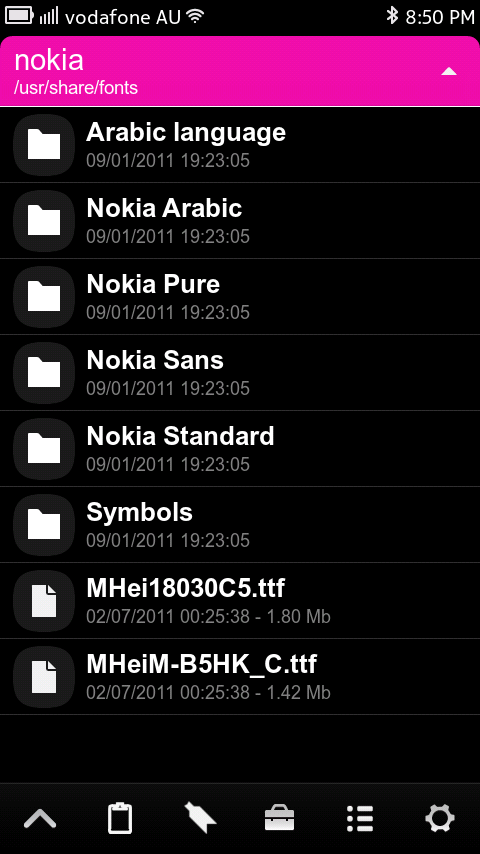
There were several font types listed in the system’s Fonts folder, yet these are the ones included under “Nokia”, so I thought I’d just extract them. I’ve put them all into a zip file just to make it easier for people.

Nokia N9 Fonts

Hopefully some of you will benefit from this and find it helpful. If you want to know how to change the font on your Symbian device, take a look here.

Michael


Category: How to:, MeeGo, Nokia, Nseries

About the Author ()

Hi! My name is Michael. Like the others, I'm also a Student, living here in Sydney. I have a real passion for the latest technology and I'm a real Nokia buff! My aim is to keep those of you, like myself, updated with the latest in what's going on in the Nokia World. Currently sporting an N8, N9, N950 and Lumia 800. Send tips to me on Twitter via @MFaroTusino or the site's page @MyNokiaBlog, or even simply drop me an email at MichaelMNB[at]hotmail.com.au or tips[at]mynokiablog.com

Comments (45)

Trackback URL | Comments RSS Feed

Sites That Link to this Post

  1. Download Font del Nokia N9 | October 18, 2011
  2. I fonts del Nokia N9 sono disponibili per i dispositivi Symbian | October 18, 2011
  3. nokia N9 fonts | October 19, 2011
  4. Nokia N9 Fonts | October 19, 2011
  1. a says:

    hi michael,
    do nokia n9 have integrated simplified Chinese input…
    thank you…

  2. Glenn says:

    Hey Michael, are you going to make a tutorial how to use VNC to login to your N9?

    http://img831.imageshack.us/img831/5687/remote2.png

    You can do it by installing x11vnc on your n9

  3. a says:

    I’m from Malaysia… i think i should check it at the store here first… hopefully nokia may have update for all the weakness for nokia n9 soon… thank for information…

  4. Nabs says:

    Hi Michael, can we change the system font?

    • Michael Faro-Tusino says:

      I’d assume so. Just need to replace the .ttf files with the one of your choosing and reboot the device. May require root access in terminal and the use of the cp or mv command.

      • Shaun says:

        That’s the Symbian way. On Maemo there was a system configuration tool to change the font. Is that not there in Settings now?

        If not, I’d guess a tool to do it isn’t far away.

  5. xyz says:

    Did anybody manage to change fonts on Symbian Belle?

    • andy wilson says:

      I have been trying to no avail using the N9 fonts and the nokia pure from ages ago.
      I used the same methods of placing font file in resource folder on mem card as before but it doesnt work.
      any other ideas welcome!!!

      • MoritzJT says:

        I will explain later… I got it working. If you wanna check, then go to dailmobile.se forum and to modding section.

  6. Sagar Sadbhaiya says:

    Cant u just upload the fonts over here on this site as i dont have access to mediafire (@off) :( :( … really want to try those on my E7!! Thanks!!

  7. Blackidea says:

    Thanx michael

  8. what is this tool showing list of fonts?

  9. Gerardino says:

    Hello, thanks for the post.
    I managed to change the fonts on my Nokia E7-00 running Anna (v25.007) but some apps seem to be missing the font and displaying some sort of Serif or console font instead (Bubbles, gNewsReader, TwimGo, etc.). I’ve tried different fonts but nothing seems to solve that. Any ideas?

    • Michael FT says:

      They may use their own font and not set font to ‘default’ which is the system font you have changed.

      • Gerardino says:

        Well, they used some nice enough font and when I did the Nokia Pure font “installation” the apps suddenly started using this serif-like font :(

  10. Deep Space bar says:

    anyone know how to get this working on leaked belle.I’m having some issues with the font not loading up after i’ve renamed,copied and made the fonts file in the resource folder

  11. yabai.youth says:

    Wow, Nokia Pure Lite looks amazing on the N8. Thanks for the fonts!

  12. Efion says:

    You mean Nokia Pure Lite is different from the previous Nokia Pure?

  13. Asil Can says:

    Are these fonts complete? Cause the Nokia Pure files which are on internet were missing some stuff like silent icon etc.

  14. amalmansy says:

    Hi, how can I increase the font size in sms messages ?
    thank you

  15. Nik Rolls says:

    You need to switch to a better File Manager :)

    • Michael Faro-Tusino says:

      Why? Filebox is awesome. I like that I can customise the header colour when I feel like it, bookmark folders, cut/copy/paste files, rename, share, choose dark or light theme, give me system file access. It does everything!

  16. chandra says:

    hi michael, i m also living in sydney. i am using n8 and i m looking for an update. Is Anna or Belle updates available for n8 in australia?

    • Shamus says:

      Anna update should be any day now I reckon.

      But why not sell and upgrade to the N9?
      Even Michael conceded in his final review.
      That it’s a much better ph “overall”.

      Nokia has promised several times now, support until 2015.
      And clarified further that such support will include “at least” 2 major updates, & dozens of minor updates/bug-fixes.
      Plus the community support will be “at least” as strong as the N900′s.

      Everything about it’s whole trajectory is quite different to the N900, wrt official support.

  17. RIZWAN says:

    hi micheal. can u please tell me how to make font bigger in N9. i want to do the messaging fonts bigger. it is really urgent. will wait for your reply.plz reply me soon.

Leave a Reply