
N9Hacks: Wallpaper for homescreen/multitask/today screen
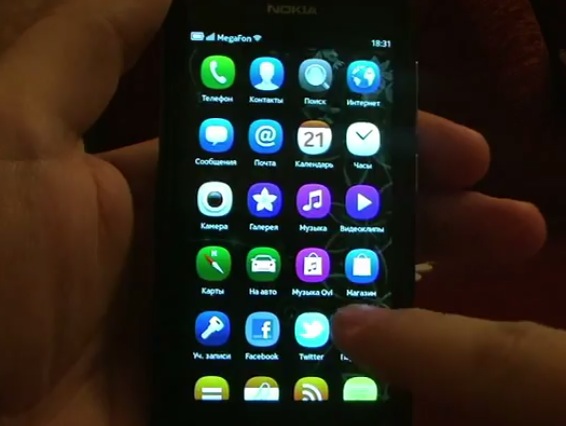
If the clean black wasn’t doing it for you and you wanted a background for the N9 well here’s a demo of it in action as well as instructions by kuzmichov
Do this at your own risk. We recommend going to the link below for further clarification.
Instructions:
1. Create your background image size of 480×854 in PNG format
2. Rename it to meegotouch-desktop-bg.png
3. Copy the resulting file to your smartphone in the Downloads folder
4. In the same folder Downloads unzip libmeegotouchviews-modified-default.css from the archive (http://www.mediafire.com/?b05rri3b3x20ris).
5. Open a terminal and type:
devel-su rootme (the default password) cp -f /home/user/MyDocs/Downloads/meegotouch-desktop-bg.png /usr/share/themes/blanco/meegotouch/images/backgrounds/ cp -f /home/user/MyDocs/Downloads/libmeegotouchviews-modified-default.css /usr/share/themes/base/meegotouch/libmeegotouchhome/style/
6. Reboot
https://www.youtube.com/watch?&v=WalWBeLqDa4
Video by kuzmichov
Cheers AmmAR for the tip!


I heard this was coming in the next update? Mentioned on ideasproject a while back. But still cool. Getting loan replacement N9 for now, so will be able to test more of these
Since the code isn’t very readable.
devel-su
rootme (the default password)
cp -f /home/user/MyDocs/Downloads/meegotouch-desktop-bg.png /usr/share/themes/blanco/meegotouch/images/backgrounds/
cp -f /home/user/MyDocs/Downloads/libmeegotouchviews-modified-default.css /usr/share/themes/base/meegotouch/libmeegotouchhome/style/
these mods are making the n9/Meego better and better just like the Symbian Belle Mods wow
some ready-made images with the right size are the lock-screen wallpapers, which are at /home/user/MyDocs/.wallpapers. There’s even a “water drops on glass” for those who miss teh shiny of iOS
It might just be coincidence but there is a lot of new activity going on with meego lately. Considering I just placed an order for mine (64gb black), I’m feeling that much more confident in my transition from symbian. Keep up the good work everyone at or around meego
!
EXCELLENT!! One of my main complaints about the N9 just went away. Thank you!
I like my background blank as it is. Keeps the classy look
i love it too. I want to keep it as prestine as possible but of course, there are more who wants to tinker, plus an option is always nice. Thats how n9 exists, as an alternative to some lesser UI
Agreed. BG only distracts the user from the content.
after
cp -f /home/user/MyDocs/Downloads/meegotouch-desktop-bg.png
permission denied, any helps please ;(
Have you forgotten to do:
devel-su
Prior to the copying part?
i did it..n followed all the instruction..
It should work. Check you have typed the command right, and that you are copying the file out of /home/user…. and not into it. If you are copying in to it, you don’t have access as root.
cp -f /home/user/MyDocs/Downloads/meegotouch-desktopbg.png/usr/share/themes/blanco/meegotouch/images/backgrounds/
-actually is one line, and,
cp -f /home/user/MyDocs/Downloads/libmeegotouchviews-modified-default.css/usr/share/themes/base/meegotouch/libmeegotouchhome/style/
also in 0ne line, tanx ;D
is it possible to add different wallpapers to each home views?
and what are the useful and basic n9 treminal commands that a beginners should know?
Great hack. Works fine, however the accuweather symbols on event screen has the black background around so it looks really ugly. When in landscape mode the background image is squashed to fit into landscape and again, really ugly. Also having a background image does make the screen feel a little smaller
[...] Source: mynokiablog.com [...]
Nice find, thanks.
Never again will I attempt this terminal stuff!! Give me an App and I will gladly pay for it.
Help, i can’t access my developer mode
It can’t turned on
Hello,
I have tried this hack, i did exactly what it’s said on the instruction, i reboot the phone and i have a…………red/orange wallpaper :s
I tried to reboot again the phone, thinking it’s a bug, it’s the same, so i want to return to the standard state by replace the libmeegotouchviews-modified-default.css file with the original one and i reboot the phone and…it is the same :s :s
Can somebody help me please??
Nokia N9 has already got a pretty gorgeous QWERTY keyboard and even SWYPE keyboard with PR 1.1 software update, but many people who were used to Alphanumeric Keypad are missing its presence on Nokia N9. Now your wait is over guys, as you can have Alphanumeric keypad on your Nokia N9 with some tweaking. Special thanks to Rusnak-COBRA for this contribution. Go to this web and follow the direction n9fanclub.com
[...] o aparelho ganhou modo de funcionamento também em modo paisagem e a possibilidade de mudar o papel de parede nas telas de Feeds, Tarefas e Apps. Alteração para a exibição das telas em modo [...]