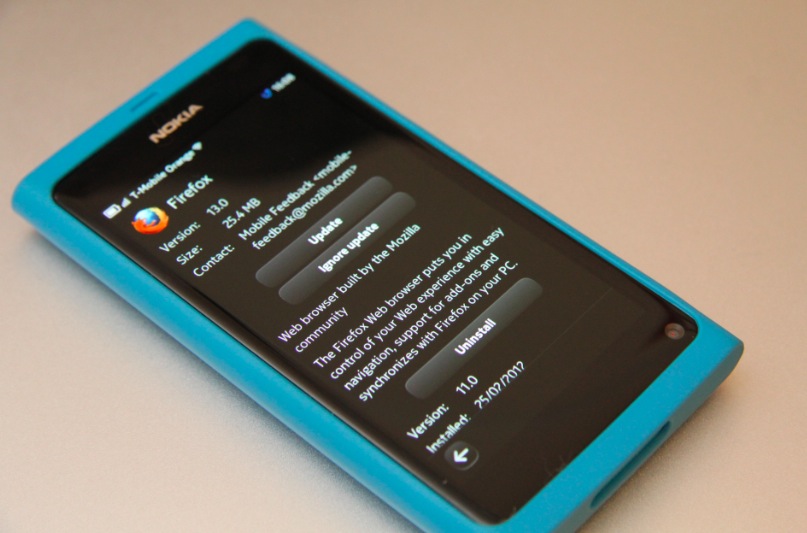
N9Apps: FireFox updated to V13 (24.5mb) for Nokia N9
FireFox has been updated to v13. This file is 25.4MB in size.
Now you can see in the photo that the last version I was on was v11. That’s because I kept getting installation errors. At the time I couldn’t even get FF to uninstall so I could reinstall it later.
I got installation failed again but this time I was able to uninstall FireFox. However, I can’t seem to find firefox in the store anymore. How do I get FireFox again?
Update:
Some folks have left download links in the comments – cheers guys!
You can download firefox v13 for N9 here: http://dl.dropbox.com/u/24783636/fennec_13_443205.0_armel.deb
- I also reinstalled/updated flash. It’s ok I guess but something flash intensive like BBC iPlayer ends up with out of sync video or 4fps video.
- General rendering pretty quick and very accurate.
Cheers Raj for the tip!
Category: Applications, Maemo, MeeGo, N9Apps, Nokia


http://dl.dropbox.com/u/24783636/fennec_13_443205.0_armel.deb
Thank you! How very awesome of you
I now have firefox again.
Though it seems to be not very stable. :/ Will reinstall flash and restart. see if that does anything.
jay firefox has been removed from the store due to packaging errors. if you’ve uninstalled it go to your apps page in store and find for firefox there. it’ll show up there. click download. once its downloaded either partially or fully simply go to /var/cache/apt/archives/partial. click on fennec there and it’ll finish the download before completing the installation.
Seems to happen a lot lately, packaging errors. Both MoloMe and Firefox keep giving me download errors. Never mind, still got Rosie Cam…
Download the version you want from here: romaxa.info/fennec
It wasn’t ported by Mozilla, it was ported by Romaxa. It’s officially unofficial.
I downloaded before dissapear from Nokia Store, now I uploaded to my dropbox, here is the link:
https://www.dropbox.com/sh/7e98atnial8trst/jPMFHNbpNn/fennec_13_443205.0_armel.deb
I wanted to upload my usual http://html5test.com screenshot from the new version a couple of days ago, but it doesn’t work this time. Don’t know if something about Gecko in FF 13 is broken, or the site has some problem…
Ha, the culprit is Adblock Plus, disabled it for html5test and it works fine now:
311+9
… which can’t be said for the unreliable embedding in the content system. Here’s a direct link: http://i47.tinypic.com/34e6wrl.png
Imo default web browser is better than FD. I just kept FF for Youtube since you can’t watch every video via mobile site.
Off topic, are those scratches at the bottom of your screen? is it me or is the N9 screen easy to scratch? I had to pull it out and my coins left some damage that’s clear from some distance
There’s tonnes of threads about that over at talk.maemo.org.
Some really informative ones about how to avoid/mitigate chips/scratches occurring.
And remove or greatly reduce their visibility if it’s too late.
It’s slightly more susceptible due to the curvature of the screen.
I personally have not had a single issue.
And I don’t always treat it with kitten gloves.
And I’ve owned it for ages now… Touch wood.
But there’s def. some great approaches to avoiding it & fixing it in many threads at TMO.
So doing some careful research is worthwhile.
Easily scratchable, IMHO. My N9 got a deep scratch (fortunately it’s small) and I have no idea where/when/how it happened. And i don’t want to use a screen protector, I think it would be really bad to swipe from the edges with one.
Nah, that’s either fluff or something on the camera itself. Though N9 screen (800 too) is easy to cause minor hairline scratches. Best keep it protected. Invisible when the screen is on but clear when screen is off and light reflects off it.
Try Fennec Nightly (which is at version 15 at the mo) which is a beta build of Firefox. Works flawlessly for me, and can be obtained from the everythingN9 site: http://everythingn9.com/nokia-n9-alternate-versions-of-firefox-nightly/
even better is the dev’s (romaxa/oleg) site:
http://romaxa.info/fennec
mozilla-central are the nightly builds, then there’s aurora, beta, & release.
Could you please give us a clue on what are the differences between the “regular” N9 FireFox (downloaded on the Store) and the Nightly build? I couldn’t find a changelog.
Sorry, it was a stupid question after reading the link you posted. So, any differences with the latest Nightly besides being faster?
It’s the same concept as used with desktop Firefox.
Have you no experience with using it over the years?
Fire Fox on N9, eh? Any better than Nokia Browser 7.4?
Oh most definitely yes.
well, good to hear about that, but i was already using v14 beta of firefox, it’s just geting hevier each time.
Yoi can get the beta or Nightly from here direct http://romaxa.info/fennec/
i cant install the package for some reason…saying the installation is interrupted …but i got nothing running on the phone and i tried it more than once
Restart, then try to update.
If it fails, restart, uninstall previous version, restart, install new version.
App update and installing the .deb linked in the article both failed.
I had to uninstall 12.0, install the 13.0 .deb, and then I had to restart to get the FF icon in the app screen, it wouldn’t appear otherwise.