Advertisements
Advertisements

Category: Nseries

Advertisements
Video: Super Tux on the Nokia N900 – reconfigure keyboard to have "D-pad" on the left for gaming.

Video: Super Tux on the Nokia N900 – reconfigure keyboard to have "D-pad" on the left for gaming.

| December 13, 2009 | Reply

Advertisements This is a quick 4 minute video to show the game “Super Tux” on the Nokia N900. This game uses the N900’s QWERTY keyboard, with arrows for navigation and predefined letters for jump/power/duck. Now, the N900 doesn’t have a D-pad like the N97, but you can change the controls so you can still have […]

Read More

FULL N900 Talktime Test (3G Connection)!

FULL N900 Talktime Test (3G Connection)!

| December 12, 2009 | 27 Replies

Hey all, I’m sure a lot of you have seen Nokia’s N900 talk time test with the talking clock? if not its below. I thought that I would do my own test as Nokia’s one is only really half a test (it’s assuming that if the battery is showing half left that it will last […]

Read More

Low light photo and flash test: Nokia N97 versus Nokia N900 versus Nokia N82

Low light photo and flash test: Nokia N97 versus Nokia N900 versus Nokia N82

| December 12, 2009 | 10 Replies

Here’s some low light photo conditions with the N900; testing out its flash against the N97 and the king of flash, and over 2 years old (absolutely ancient in tech), the N82. I know I harp on about Xenon, but these set of photos demonstrate yet again why it’s just so good! Real xenon flash […]

Read More

Video: Twitter on the Nokia N900: via browser versus via app (Mauku)

Video: Twitter on the Nokia N900: via browser versus via app (Mauku)

| December 11, 2009 | Reply

[youtube=http://www.youtube.com/watch?v=CRS5lUTO9S4] This video was made a couple of days ago and was initially just to show Mauku running on the N900. It’s a very simple, fast and easy to use twitter application, getting you to your twitter feed and sending out tweets quickly – respond/retweet and check out other people’s posted links. To get Mauku, […]

Read More

How To: Rotate to portrait to make calls on N900

How To: Rotate to portrait to make calls on N900

| December 10, 2009 | Reply

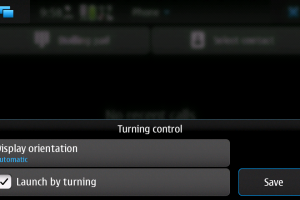
In the very first view preview videos of the Nokia N900, we saw that in contrast to the landscape oriented OS, when the N900 is turned in portrait, it activates call mode. Now this is particularly helpful since the N900 doesn’t have any hardware call/end keys. At best, you have to press the power button […]

Read More

Video: Smooth YouTube viewing directly from YouTube.com on the Nokia N900

Video: Smooth YouTube viewing directly from YouTube.com on the Nokia N900

| December 9, 2009 | Reply

Just a short video under 1 minute to look around YouTube.com on the Nokia N900 and the smooth video playback with its flash 9.4. No app necessary, no client, no mobile version. This is YouTube raw…on the N900 and as you can see from the video, ever so slightly cutesified! One of the main reasons […]

Read More

My mini N900 Review (loaded with screenshots)

My mini N900 Review (loaded with screenshots)

| December 8, 2009 | Reply

Hey all, This is my first post on MyNokiaBlog.com so thought I’d share with everyone a post I put on the Maemo-Freak forum a week ago. Before I start, I thought I’d just thank Jay so letting me post on here…OK now down to it!! I got my phone a week and a bit ago […]

Read More

Video: Tour of the N900's Panoramic Desktop/Homescreens – What do your homescreens look like?

Video: Tour of the N900's Panoramic Desktop/Homescreens – What do your homescreens look like?

| December 7, 2009 | Reply

In this video I demonstrate how I’ve been using Maemo 5’s panoramic desktop on the Nokia N900. Quick show of my four desktops How to add apps shortcuts/bookmarks/widgets How to change the background What do your homescreens look like? [Ctrl+Shift+P to print screen] [youtube=http://www.youtube.com/watch?v=s0TN3GKv-LI] We’ve had customizable desktops/homescreens on a Nokia for quite a while […]

Read More

How to: Remove the back cover of the Nokia N900/Insert a wrist strap

How to: Remove the back cover of the Nokia N900/Insert a wrist strap

| December 6, 2009 | Reply

This is a quick video that shows how to remove the battery cover and also how to insert a wrist strap. [youtube=http://www.youtube.com/watch?v=YYrPvIsVBj4] The back cover mechanism has been gradually refined over the years with Nseries. I remember the flimsy connecting stubs of the N95 and N93’s battery covers; they were so weak, they broke if […]

Read More